Practice OS
Med spa management software
Practice OS puts scheduling, charts and checkout on one record. AEVA Digital is a provider of med spa management software.

Appointments today
37
Show rate, 30 days
94%
New bookings, 30 days 1,374
- All channels
- Booked by AEVA
 Priya Raman 53% booked
- 10:00 Neurotoxin, forehead
- 10:45 Lip filler, 1 syringe
- 11:30 New patient consult
Talia Brenner
Signature member3,400 points
Appointments
-
Fri Sep 25
HeldLip filler consult
 Priya Raman
-
Fri Sep 18
CompletedHydraFacial Signature
 Marisol Ortega
- Hi! My friend Hannah sent me your way. Do you do HydraFacials?
- We do, Talia. Want a link to book your first HydraFacial?
AEVA recap

Talia asked about lip filler pricing for tomorrow. Mei held 2:15 PM with Priya.
Neurotoxin injection record
- Glabella 20 units
- Forehead 12 units
Total 32 units
Microneedling consent
- Risks reviewed together
- Full medical history shared
- Post-care instructions received
Signed by Hannah Whitlow
Practice OS, patients. Demo data.
Watch Practice OS
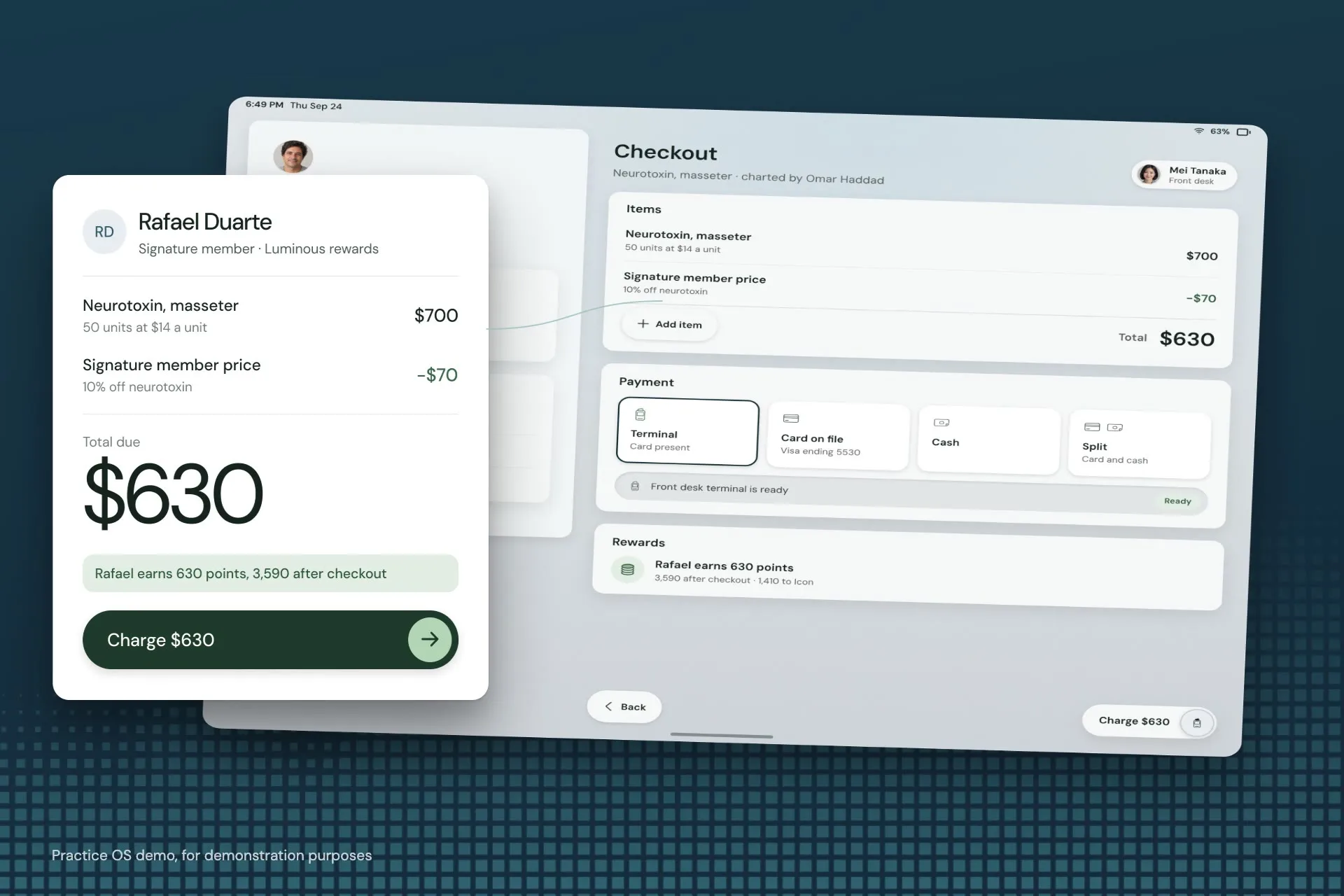
Booking to checkout in Practice OS
See Practice OS in action.
In the film
- Check-in at the front desk
- The visit, charted on the record
- Checkout on the same record
Read the transcript of AEVA's film
A patient books a microneedling visit from her phone, at a time that's really open.
The booking lands on your scheduler, and Practice OS catches a room and device conflict before it happens.
At check-in, she reads and signs her consent on the tablet.
Her provider charts the visit from a template, with units by zone.
Checkout happens on the same record, with her member price already applied.
Booking, chart and payment, all on one patient record.
How it connects
How does Practice OS connect to the marketing?
Growth Engine's Meta and Google leads get tagged on the patient record. Your team books and checks out there. Revenue traces back to its campaign.
Brings patients in
Growth Engine
- Paid ads Meta and Google campaigns
- SEO Local and AI search
- Websites Pages built to book
- Video Real footage from your practice
- Social media Posts that bring people back
writes the source

reads it at the desk
One record
Ad, booking, chart, checkout
- Lead source Instagram DM Growth Engine
- Booking Lip filler consult, Fri Sep 26 Practice OS
- Visit and chart HydraFacial Signature, charted Practice OS
- Payment Paid at checkout Practice OS
Runs the visit
Practice OS
- CRM
- Scheduling
- Charting
- Payments
- Memberships
- Messaging
- Patient app
- AI receptionist
Practice OS at work
Can I run the practice from my AI assistant?
In part, yes. Check today's bookings on the mobile dashboard, or ask your AI assistant once AEVA grants MCP access.
 Your AI assistant, connected through the AEVA MCP
How did today go at the Ridgewood clinic?
Here is today from Practice OS, Ridgewood clinic.
$14,849
- 38 Appointments
- 94% Show rate
- 71% Rebooked
- 17 New inquiries
Needs you
- Tessa Lindqvist’s card declined on her membership renewal
- Leo Castellanos is unconfirmed for 7:20 PM with Julian Marlow
Move Leo to Friday at the same time.
Ready to reschedule Leo to Friday, 7:20 PM. This waits for your confirm. Confirm
Connect ChatGPT, Claude, Gemini or another AI assistant to your practice data through the AEVA MCP.
- Your AI assistant ChatGPT, Claude, Gemini or another
- You ask in plain words
- AEVA MCP Runs inside your own AI client The link
- Reads within your permissions
- Practice OS Where your practice data lives
- Your own AEVA login
- Your practice only
- Changes wait for your confirm
- MCP access on request
Features
Twelve features. One record.
Each one has its own page.
-
At the front desk
-
In the treatment room
- Charting Charts, consents, photos
- Patient app Your own branded iOS app
- Forms and consents Intake forms and consents, signed and kept on the record.
-
With every patient
-
On the phones
- AI receptionist Answers your calls and books visits.
- AI call intelligence Every call scored and summarized.
- Call coaching Front desk coaching from scored calls.
Plans
Software alone, or with the marketing
If your marketing is already in good hands, you can buy Practice OS on its own. If you'd like AEVA's experts running it, pick a Growth Engine plan.
| Compare the plans Practice OS is inside both. The Growth Engine adds the marketing. | Software Practice OS Practice OS can be bought on its own. | Software and marketing Growth Engine Practice OS included |
|---|---|---|
| Software | ||
| Practice OS: CRM, scheduling, charting, payments and the rest | Included | Included |
| One patient record across the practice | Included | Included |
| HIPAA compliant, with a signed BAA | Included | Included |
| Marketing | ||
| Marketing services: ads, SEO, websites, content, social, outreach | Not included | Included |
| AEVA manages your ad accounts | Not included | Included |
| Ad spend billed to your practice directly by Google and Meta | Not included | Included |
| Working with AEVA | ||
| An AEVA expert works with you directly | Included | Included |
| See how pricing works | Book a demo | Book a demo |
-
Software
Practice OS
Practice OS can be bought on its own.
Software
- Practice OS: CRM, scheduling, charting, payments and the rest
- Included
- One patient record across the practice
- Included
- HIPAA compliant, with a signed BAA
- Included
Marketing
- Marketing services: ads, SEO, websites, content, social, outreach
- Not included
- AEVA manages your ad accounts
- Not included
- Ad spend billed to your practice directly by Google and Meta
- Not included
Working with AEVA
- An AEVA expert works with you directly
- Included
-
Software and marketing
Growth Engine
Practice OS includedSoftware
- Practice OS: CRM, scheduling, charting, payments and the rest
- Included
- One patient record across the practice
- Included
- HIPAA compliant, with a signed BAA
- Included
Marketing
- Marketing services: ads, SEO, websites, content, social, outreach
- Included
- AEVA manages your ad accounts
- Included
- Ad spend billed to your practice directly by Google and Meta
- Included
Working with AEVA
- An AEVA expert works with you directly
- Included
Getting started
From sign-up to ready
You can start on Practice OS right away, but texting can take up to a week to switch on (it needs your business details first).
-
Sign up
Open an account for your practice.
- BAA signed at sign-up
-
Business details for texting Up to a week
Send us your business details for texting.
- Texting switches on
-
Meet the AEVA team
We learn how your practice runs, so we build to fit.
- Your AEVA expert
-
Training
Your team gets trained on Practice OS.
- Front desk
- Providers
-
Ready
You're up and running!
- Booking
- Charting
- Checkout
Migration
Migration means moving your patient list and appointment history onto AEVA.
- Patient list
- Appointment history
- Import it yourself Bring your own data across.
- AEVA’s team does it The AEVA team moves it for you.
Integrations
Practice OS connects with many of the systems practices already use, including EMRs.
- EMRs
- Webhooks
- Payment processor
- Tax
Practice OS can also connect to other platforms through webhooks.
Key facts
Practice OS, at a glance.
The short answers practices ask for first.
Practice OS and Growth Engine.
One patient recordfor the whole practice.
Founded 2021
-
Offer structure
Every Growth Engine (digital marketing) plan includes Practice OS. Practice OS can be bought on its own.
-
Security
AEVA is HIPAA compliant. AEVA signs a Business Associate Agreement (BAA) with every customer at sign-up.
-
Team access
Every practice works directly with an AEVA expert, whatever the plan.
-
Integrations
Practice OS connects with many of the systems practices already use, including EMRs.
-
Ad spend
AEVA manages your ad accounts, and the ad platforms bill your practice directly for ad spend.
-
Contact
sales@aevadigital.com1-833-4-MYAEVA
Before a demo
Practice OS questions
A few quick answers before you book a demo.
Can I buy Practice OS without the marketing?
Yes. Practice OS can be bought on its own, and you won't need to buy marketing services with it. Every Growth Engine plan includes Practice OS as well.
How pricing worksCan Practice OS replace my scheduler and checkout?
Practice OS can. AEVA can replace the scheduler, the charting tool and the point of sale, or connect with the systems a practice keeps, including EMRs.
How to choose med spa softwareDoes Practice OS connect to my EMR?
Practice OS connects with many of the systems practices already use, including EMRs. It can also connect to other platforms through webhooks. Bring your current setup to a demo and the AEVA team will walk you through how the connection works.
Who moves my patient list onto Practice OS?
You choose. You can import your patient list and appointment history yourself, or the AEVA team moves it for you. Either way, your front desk works from one patient record from day one.
Is my practice data secure in Practice OS?
AEVA is HIPAA compliant and signs a BAA with every customer at sign-up. AEVA never uses patient data to train AI models. Each person signs in with their own AEVA login and sees only what their permissions allow.
How long does it take to get started?
A practice can start right away. Texting can take up to a week to switch on after you share your business details. In the meantime the AEVA team learns how your practice runs and trains your front desk and providers.
Does Practice OS have an AI receptionist?
It does. The AI receptionist picks up your calls and books visits. Built into Practice OS, and available to any account as an add-on.
Can I connect my AI assistant to Practice OS?
Yes. Connect ChatGPT, Claude, Gemini or another AI assistant to your practice data through the AEVA MCP. It sees only your practice, within your permissions, and booking or rescheduling waits for your confirm. AEVA grants MCP access on request.

Run your practice on one record
Practice OS keeps scheduling, charting and checkout on one patient record. Book a demo and bring your questions (the harder the better).
Book a demo