Healthcare reputation management software
AEVA Practice OS sends review requests, monitors reviews and replies to reviews for med spas and healthcare practices.

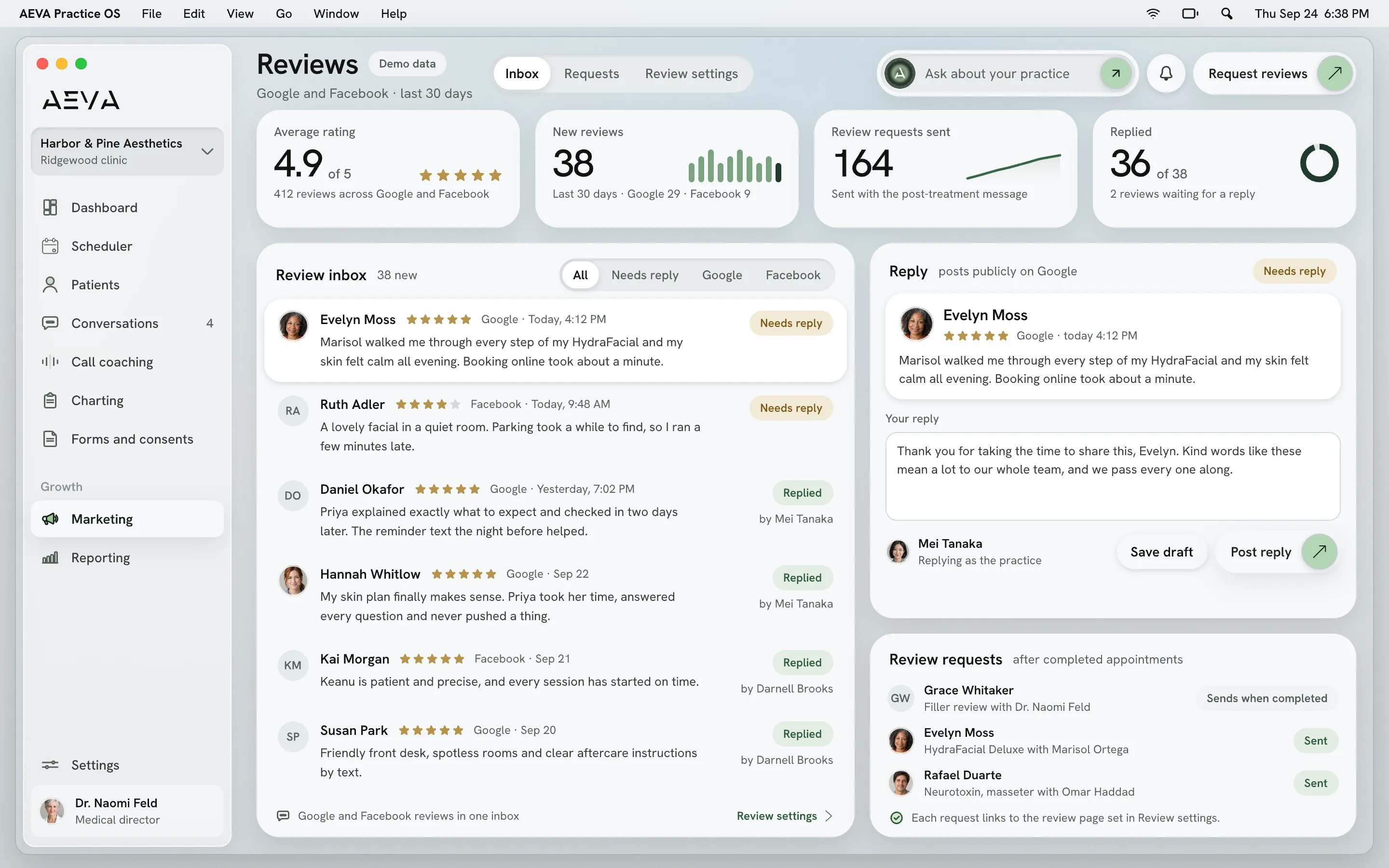
Practice OS, reviews. Demo data.
See it working
Reputation management in Practice OS
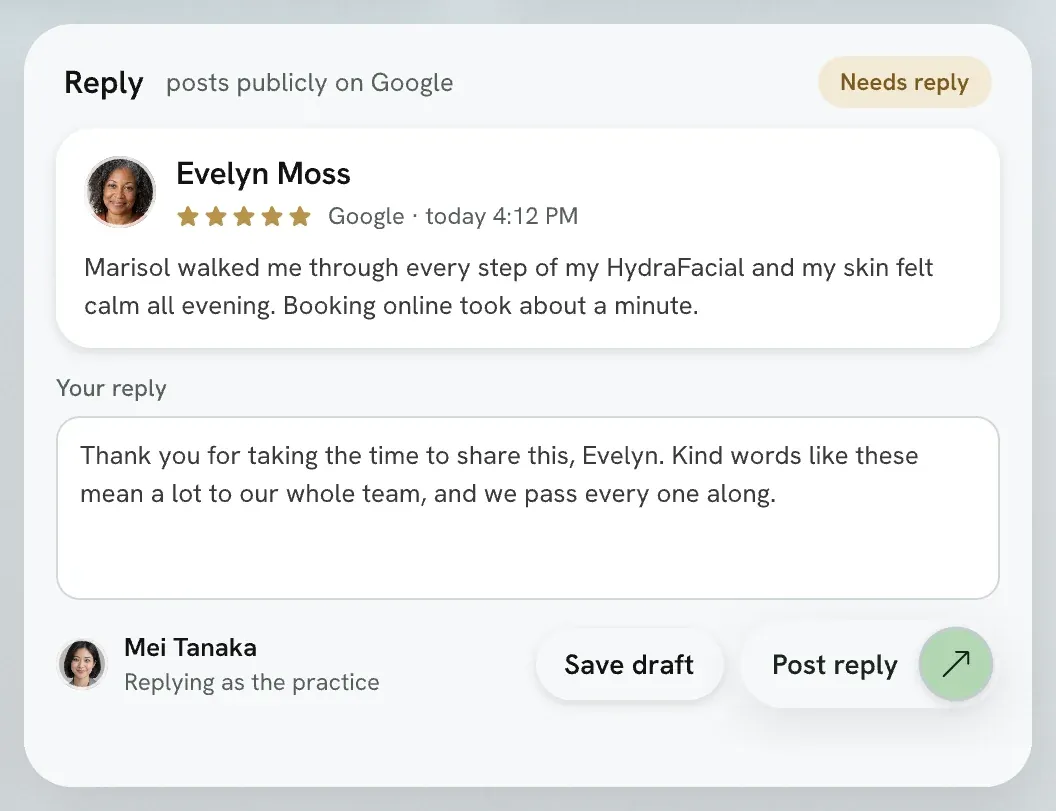
Here's the Reviews page your front desk would open in Practice OS (demo data, of course). The list in the middle holds new reviews with the star rating and the patient's comment. Each is tagged needs reply or replied. The reply box is on the right. Review requests for completed appointments are listed under it.
Watch Practice OS
Booking to checkout in Practice OS
Watch Practice OS at work. The film has captions, and the full transcript is on this page.

In the film
- Check-in at the front desk
- The visit, charted on the record
- Checkout on the same record
What it does
Ask for reviews, then answer them
Practice OS asks patients for reviews after a completed appointment and monitors the ones that come in. Your team replies from Practice OS.
-
A review request after the visit
Your team marks an appointment completed, and Practice OS sends the patient a post-treatment message with a review request. You set the wording and the timing. The request carries the custom review link from your practice profile.
-
Follow-ups on the timing you set
Practice OS campaigns include a review request starter template, and you can edit the default message on each step. You set the timing between steps (a two-week follow-up is one example). When the sequence ends, Practice OS can drop the patient into your next campaign.
-
Reviews monitored for you
Practice OS monitors your reviews, so new ones show up where your team already works. Your front desk reads each one and decides how to answer it. Nobody has to remember to go looking.
-
Replies from inside Practice OS
When a review comes in, your team answers it from Practice OS. Your team decides what each reply says and who on staff handles them. Practice OS also handles social response management.
Limits and handoffs
What does reputation management not do?
Reputation management in Practice OS asks, monitors and replies. Your patients write the reviews, and your team decides each reply.
What it leaves out
- Practice OS never writes or posts a review on a patient's behalf.
- Practice OS can't take down a review. Only the reviewer or the hosting site can.
- Practice OS doesn't run your local SEO. That's a Growth Engine service from AEVA's experts.
When a person takes over
Your team owns every reply. Your practice manager or front desk lead decides what it says. On a negative review, they keep patient details out of the public answer.
Getting set up
From sign-up to your first request
Your patient list and appointment history move onto AEVA. You can import them yourself, or AEVA's team can do it.
- Sign up You sign up and send in your business details, which AEVA needs to switch on texting.
- Meet the team You meet the AEVA team and walk them through how your practice runs, so AEVA builds to your needs.
- Training AEVA's team trains your staff on Practice OS after your planning meeting, so the front desk knows the system.
- Ready You're ready to go. Your practice can start right away, even while texting is still being switched on.
Texting can take up to a week to switch on.
Key facts
What to know about reviews
The short version of what Practice OS does with reviews, who it's for and how you buy it.
In short
AEVA Digital is a provider of healthcare reputation management software for med spas, plastic surgeons, dermatologists and other healthcare practices. Practice OS sends review requests, monitors reviews and replies to reviews. A request can go out after an appointment on the patient's record is completed.
See how pricing works
Reputation management at a glance
- Status
- Review requests, monitoring and replies are live today.
- Trigger
- A completed appointment can send a review request.
- Campaigns
- A review request template with editable steps and timing.
- Replies
- Your team replies to reviews from Practice OS.
- Built for
- Med spas, plastic surgeons, dermatologists and other healthcare practices.
- How to buy
- Included in every Growth Engine plan, or Practice OS on its own.
Before a demo
Reputation management questions
A few quick answers before you book a demo.
How much does reputation management in Practice OS cost?
Reputation management comes with Practice OS, which you can buy on its own. Every Growth Engine plan includes Practice OS. The pricing page explains how plans work.
How pricing worksIs this reputation management for doctors and plastic surgeons?
Practice OS handles reputation management for doctors as well as med spas. Plastic surgeons and dermatologists can send review requests, monitor reviews and reply from one place.
Can we change the review request message and timing?
The review request message and its timing are both yours to edit. Practice OS lets you rewrite the post-treatment message and choose when it goes out.
Where do review requests send our patients?
Review requests send patients to the custom review link in your practice profile. You set the link there, and the templates use it.
Is reputation management in Practice OS HIPAA compliant?
Practice OS has role-based permissions and two-factor authentication. AEVA is HIPAA compliant. AEVA signs a Business Associate Agreement (BAA) with every customer at sign-up.


Bring your reviews into Practice OS
Practice OS asks for reviews after completed appointments, monitors the new ones and lets your team reply to each. Every practice works directly with an AEVA expert, whatever the plan.
Book a demo