
Platform
Scheduling that runs the practice from one queue.
AEVA's med spa scheduling software runs a multi-provider practice from one shared queue. Appointments, rooms, devices, and providers all book against the same record, with conflict detection so nothing double-books, and every visit stays tied to the patient and the campaign that earned it.
How it works
The whole day on one screen.
The AEVA scheduler books across providers, rooms, and devices at once, and it catches the conflicts a standalone calendar misses. Patients book online in about a minute or rebook a past visit in a tap, reminders go out on their own, and the front desk works the whole day from one screen instead of reconciling separate calendars by hand.
-
Provider columns, click to book
Book across providers, rooms, and devices from one day view. Each service auto-fills its duration, and you can override any of it per booking.
-
Conflict detection on rooms and devices
The scheduler flags a double-book on a room or a device before it lands, so a busy Tuesday never puts two treatments in one laser room.
-
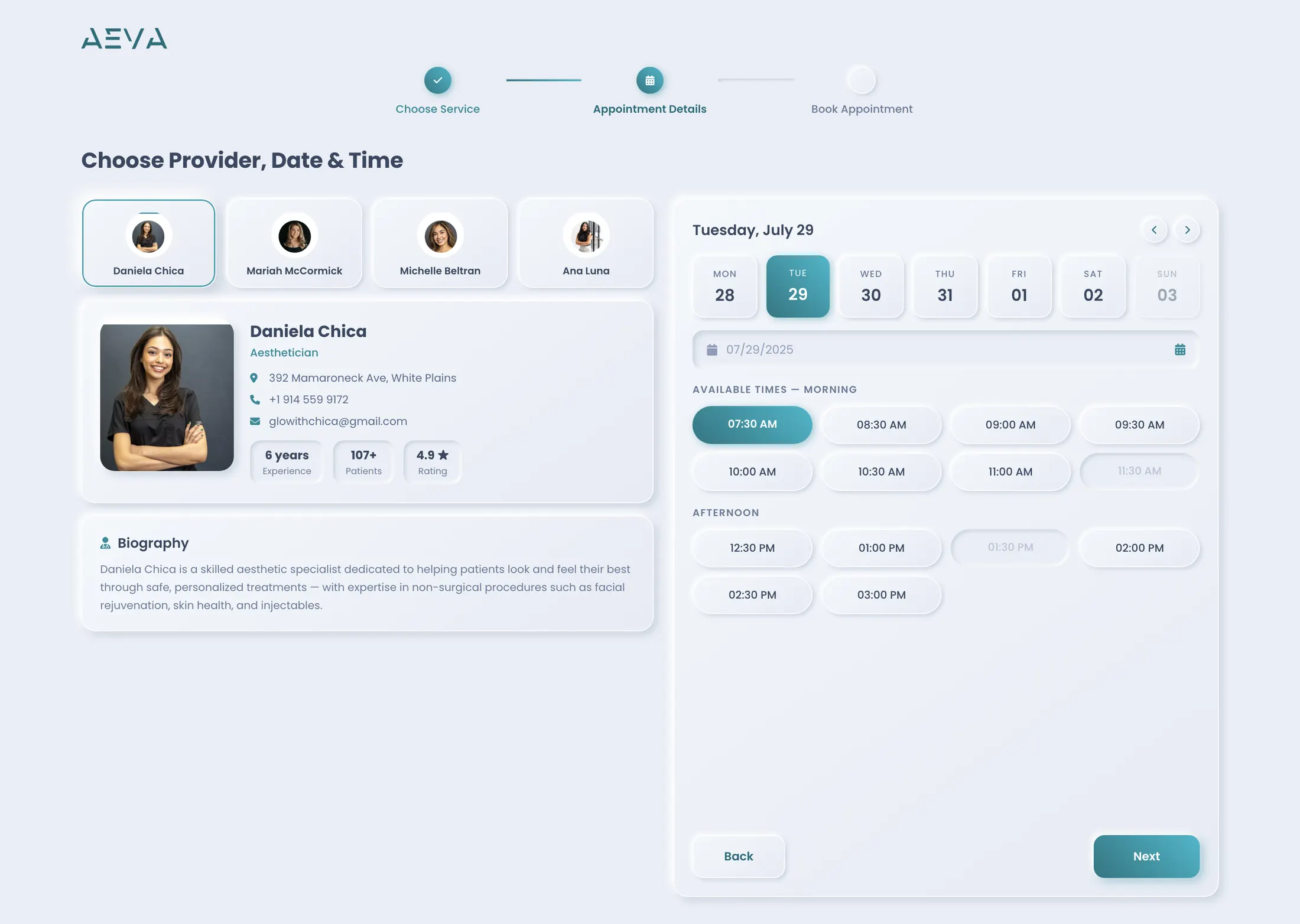
Patients book themselves
The public scheduler shows real providers and only the treatments they perform. Patients book, request a consult, or rebook a past visit, all writing to the same record.
-
Reminders that run themselves
A confirmation text goes out the day before, then again one to two hours out if the visit is still unconfirmed. The copy and the timing are yours to set.
The conflict a calendar can't see
A plain calendar works like a seating chart that tracks people while ignoring the room and the equipment. It knows a provider is open at eleven, but not that the laser is already booked elsewhere and the injectable cart is out on another floor. AEVA books the appointment against the room and the device it needs, so a clash surfaces the moment someone creates it, not when two patients show up for the same machine.
Every way a visit gets booked
A booking can start from the scheduler, the dashboard quick-book, a patient's contact card, the patient app, or the practice website, and all of them write to the same record. There is no separate online-booking inbox to reconcile at the end of the day, because the online booking and the front desk are the same calendar.
The week the practice runs
Working hours are set per practice, and employee calendars go in as bulk patterns (weekly, bi-weekly, or three-week) with cherry-picked days on top. Vacation and time-off get marked once and the scheduler respects them everywhere, so nobody books a patient into a provider's day off and then has to make the apology call.
Step by step
The life of a booking.
Follow one appointment from the first tap to the reminder that brings the patient in. Each step happens on the same shared record, so the visit the front desk sees is the visit the patient booked, and nothing gets re-keyed between an online form and the calendar the practice works from.
-
The request comes in
A patient picks a service from the app, the website, or asks at the desk. The scheduler filters to the providers who perform that treatment.
-
Only real openings show
The patient sees the time slots that are genuinely open, checked against the provider, the room, and the device the service needs, in fifteen-minute increments.
-
The visit is booked
The appointment lands on the shared record with the right duration, and an optional card capture or booking fee filters out the no-shows at the moment of booking.
-
The reminder brings them in
A confirmation text goes out the day before and again one to two hours out. The front desk opens the dashboard to a day where every arrival is already confirmed.
The difference
One system or four calendars.
A practice can run scheduling from a standalone booking tool, a separate room whiteboard, an email inbox for online requests, and a reminder app bolted on the side. Each tool works on its own. The day does not, because every gap between them is a place a double-book slips through or an online request never reaches the calendar.
| What you are comparing | On the AEVA record | A bolted-on stack |
|---|---|---|
| Where a booking lives | On the shared record, with the patient and the campaign that earned it | In a booking tool, separate from the chart and the checkout |
| Rooms and devices | Booked with the visit, with conflict detection on both | Tracked on a whiteboard the calendar can't see |
| Online booking | The same calendar the front desk works from | A request inbox someone re-keys by hand |
| Provider availability | Bulk patterns plus vacation, respected everywhere | Kept in a spreadsheet and forgotten on days off |
| Reminders | Automatic, day-before and hours-out, copy you set | A second app with its own patient list to sync |
| What happens after the visit | Charting and checkout open on the same profile | Re-entered into whatever system holds the record |
- Where a booking lives
- On the shared record, with the patient and the campaign that earned it
- In a booking tool, separate from the chart and the checkout
- Rooms and devices
- Booked with the visit, with conflict detection on both
- Tracked on a whiteboard the calendar can't see
- Online booking
- The same calendar the front desk works from
- A request inbox someone re-keys by hand
- Provider availability
- Bulk patterns plus vacation, respected everywhere
- Kept in a spreadsheet and forgotten on days off
- Reminders
- Automatic, day-before and hours-out, copy you set
- A second app with its own patient list to sync
- What happens after the visit
- Charting and checkout open on the same profile
- Re-entered into whatever system holds the record
For how AEVA compares to a specific platform, see the compare pages.
Who it's for
Built for a busy multi-provider practice.
A dermatology practice rotating providers through laser rooms, a plastic surgery office fitting consults around surgical and injectable time, a med spa moving one device between treatments, a longevity or wellness clinic booking IV suites and hormone visits. Each one runs on shared rooms and equipment, and that is exactly the day this scheduler was built to hold.
Practices sharing rooms and devices
One laser, two treatment rooms, a provider who floats between them. Conflict detection on rooms and devices is the difference between a smooth day and two patients waiting on the same machine, and it only works when the booking knows what equipment the service needs.
Practices that book online after hours
Patients book from the app or the website at nine at night, and those bookings land on the same calendar the front desk opens in the morning. There is no online-request inbox to clear, because the public scheduler and the internal calendar were never two different things.
Practices tired of no-show gaps
An optional card capture or a small booking fee at the moment of booking filters the price-shoppers, and automatic reminders the day before and hours out keep the confirmed visits confirmed. The day fills with people who mean to come in.
In one place
Booked, then tied to revenue.
Because scheduling shares one system with the CRM, charting, and checkout, a booked appointment is never an island. The visit already knows the patient's history and the campaign that earned it, the charting opens on the same profile, and the checkout posts back to it. That shared system is what lets the practice follow a single booking all the way to booked revenue.
Scheduling is one part of the platform that runs the whole practice. See the full platform.
Frequently asked
What practices ask about scheduling.
Straight answers to the questions practices ask most about the AEVA scheduler, from multi-provider day views and room conflict detection to online booking, reminders, and what happens to a booking once the appointment is on the calendar. Anything not covered here, we will walk through live on a demo with your practice's own providers and rooms.
How does the AEVA med spa scheduling software handle multiple providers?
The scheduler runs a multi-provider practice from one day view, with a column per provider and click-to-book. You book across providers, rooms, and devices at once, and each service auto-fills its duration, which you can override per booking. The whole day sits on one screen instead of on separate calendars the front desk reconciles by hand.
How does the scheduler prevent double-booking a room or device?
AEVA books each appointment against the room and the device it needs, and conflict detection flags a clash on either one before the booking lands. So a busy day never puts two treatments in the same laser room. A standalone calendar cannot catch this, because it only tracks whether the provider is open. It never sees that the laser is already in use.
Can patients book appointments themselves through AEVA?
Yes. The public scheduler shows real providers and only the treatments they perform, and patients book in about a minute in roughly three steps. They can book a fresh appointment, request a consultation when they are not sure yet, or rebook a past visit in a tap. Every path writes to the same record the front desk works from.
Does online booking sync with the front desk calendar?
There is nothing to sync, because online booking and the front desk are the same calendar. A booking can start from the scheduler, the dashboard quick-book, a contact card, the patient app, or the practice website, and all of them write to one shared record. No request inbox gets re-keyed at the end of the day.
How do appointment reminders work in the AEVA scheduler?
A confirmation text goes out the day before an appointment, then again one to two hours out if the visit is still unconfirmed. You set the copy and the timing yourself. There is also a post-treatment message with a review request after the visit completes, so the reminder flow keeps working after the patient has been in.
Can the scheduler reduce no-shows?
Two things help. You can capture a card or charge a small booking fee at the moment of booking, which filters out the price-shoppers before they hold a slot. Then automatic reminders the day before and hours out keep the confirmed visits confirmed. The front desk opens the dashboard to a day where the arrivals are already accounted for.
How do I set provider availability and time off in the scheduler?
Working hours are configured per practice, and each employee's calendar goes in as a bulk pattern, weekly, bi-weekly, or a three-week rotation, with cherry-picked days layered on top. Vacation and time-off get marked once, and the scheduler respects them everywhere, so nobody books a patient into a provider's day off.
What happens to a booking after the appointment is scheduled?
The booking stays on the shared record, so it carries the patient's history and the campaign that earned the visit into the room. Charting opens on the same profile, checkout posts back to it, and package credits get consumed by the completed appointment. One booking follows a straight line from the calendar to the books.
See your whole day on one screen.
Bring the way your practice books, across providers, rooms, and devices, and we will walk through how appointments, reminders, and rebooking stay tied to the patient and the revenue. You will see how much daily reconciliation the shared record removes and where a double-book gets caught before it happens.