
Platform
Charting that lives where everything does.
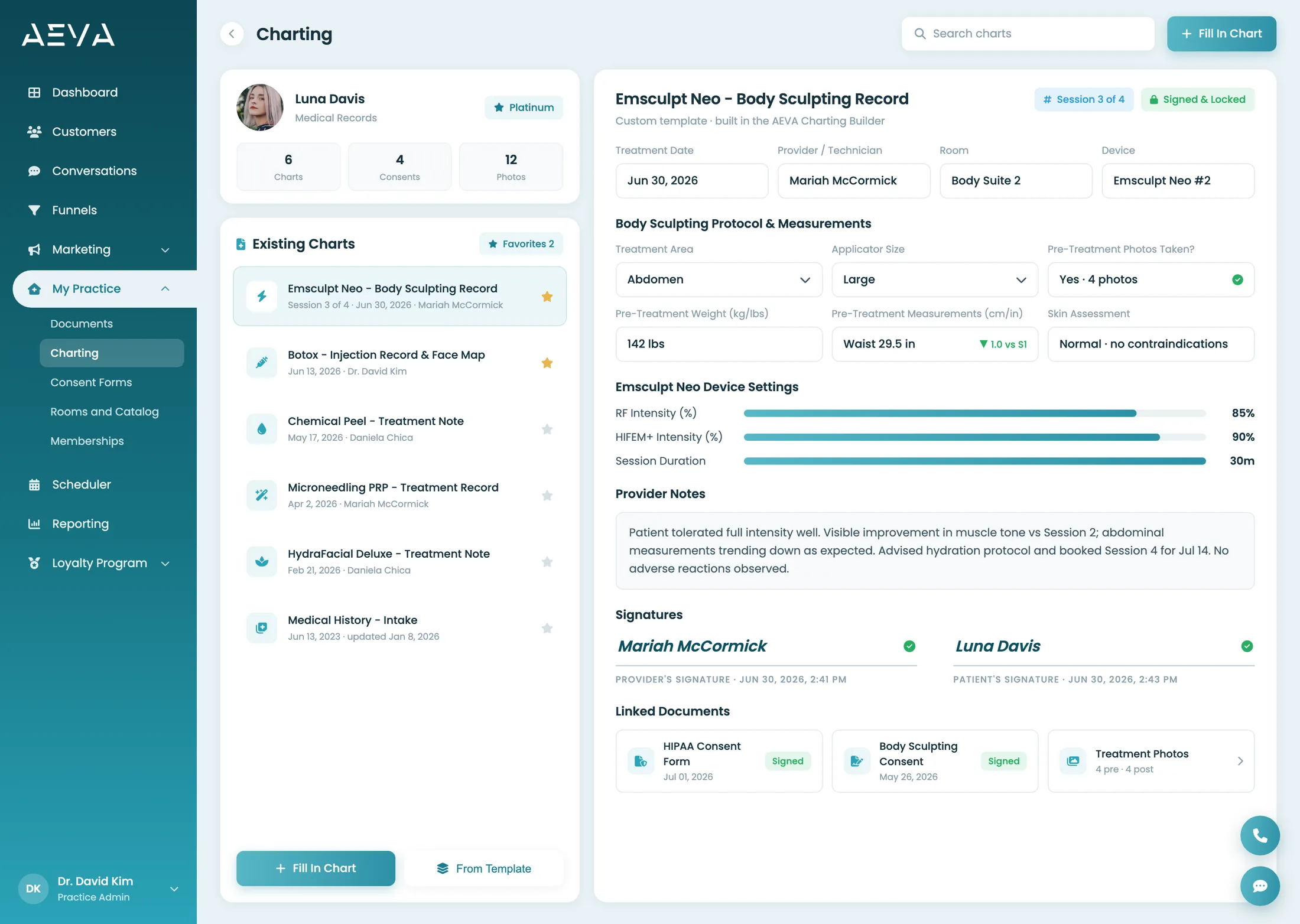
AEVA's med spa charting software keeps the clinical record where the rest of the practice already lives. Build custom charts and consent forms, capture signatures that lock, and store before-and-after photos on the same profile as the booking and the payment, so a provider opens one record and sees the whole history.
How it works
The chart lives on the patient's profile.
Providers build custom charts and consent forms, or pull one from the global template library and make it their own. Fill it on an iPad, on desktop, or send it to the patient to complete before they arrive. Practice and patient signatures capture together, the signed form locks against edits, and before-and-after photos store on the same profile as the booking and the checkout.
-
Build it once, reuse it
Build custom charts and consent forms, or add one from the global template library in a click and edit it to match how your practice documents.
-
Sign anywhere, lock forever
Capture the practice and patient signatures together on an iPad or desktop. Once both land, the record locks, so a signed consent cannot be altered after the fact.
-
Send it before they arrive
Push intake and consent through the patient app or web portal so patients complete forms at home. The signed form comes back attached to their visit, ready before the treatment room.
-
Before and after, side by side
Store treatment photos on the patient profile and compare them side by side, right where the chart, the consents, and the rest of the history already live.
The template library saves the setup
Building a consent form from a blank page is the part nobody has time for. The global template library gives you a starting form to add in one click, then you edit the fields, the wording, and the sections until it reads like your practice wrote it. A body sculpting consent and an injectable record are different documents, and each one keeps its own shape.
The lock is the whole point
A signed consent that anyone can quietly edit later is not really a signed consent. When both signatures capture, AEVA locks the record so the wording nobody agreed to cannot slip in afterward. Think of it like a notarized page. The ink is set, and the version on file is the version that was signed.
Photos belong with the chart
Before-and-after photos are useless three folders away from the treatment they document. AEVA stores them on the patient profile beside the chart and the consent, so a provider sees the note, the signed form, and the side-by-side comparison in one place, without hunting through a camera roll or a separate photo app.
Step by step
One visit, one record.
Follow a single treatment from the form the patient signs at home to the locked record the provider files. Each step happens on the same profile as the booking, the photos, and the checkout, so nothing about the visit is re-keyed into a separate clinical tool or stranded where the front desk cannot see it.
-
The form goes out first
Send intake and consent to the patient app or the web portal, so they read and sign at home instead of scribbling on a clipboard in the waiting room.
-
The provider charts the visit
The custom chart opens on an iPad or desktop, tied to the appointment and the patient, with the pre-filled forms and the photo history already sitting there.
-
Both signatures capture
The practice and the patient sign together, and the moment both land, AEVA locks the record so nothing on the signed page can change afterward.
-
The record files itself
The locked chart, the signed consents, and the before-and-after photos all sit on the one profile, ready the next time any provider opens it.
The difference
One profile or a clinical silo.
A practice can run charting in a standalone EMR, consents in a signing app, and photos on a phone. Each tool does its job. In practice the trouble is the seams. The provider opens three windows to see one patient, and the front desk re-keys the same details to keep the picture whole. AEVA keeps the clinical record on the profile everything else already uses.
| What you are comparing | On the AEVA record | A bolted-on stack |
|---|---|---|
| Where the chart lives | On the patient profile, beside the booking and the checkout | In a separate clinical system, opened on its own |
| Starting a consent form | One click from the global template library, then edited to fit | Rebuilt from scratch or bought as a rigid PDF |
| Signatures | Practice and patient capture together, then the record locks | Printed, signed on paper, and scanned back in |
| A signed record | Locked against edits, so the signed version cannot be altered | A file anyone with access can edit later |
| Before-and-after photos | Stored on the profile, compared side by side | On a camera roll or a third photo app |
| Forms before the visit | Sent to the patient app or portal, signed at home | Handed over on a clipboard at check-in |
- Where the chart lives
- On the patient profile, beside the booking and the checkout
- In a separate clinical system, opened on its own
- Starting a consent form
- One click from the global template library, then edited to fit
- Rebuilt from scratch or bought as a rigid PDF
- Signatures
- Practice and patient capture together, then the record locks
- Printed, signed on paper, and scanned back in
- A signed record
- Locked against edits, so the signed version cannot be altered
- A file anyone with access can edit later
- Before-and-after photos
- Stored on the profile, compared side by side
- On a camera roll or a third photo app
- Forms before the visit
- Sent to the patient app or portal, signed at home
- Handed over on a clipboard at check-in
For how AEVA compares to a specific platform, see the compare pages.
Who it's for
Built for cash-pay documentation.
Documentation reads differently in every room. A laser series charts differently from a surgical consent, and a med spa storing before-and-afters by the hundred needs something else again from a longevity clinic following one patient across months of visits. AEVA's charting bends to fit rather than forcing one form on them all. What they share is cash-pay volume and a record that should sit with the practice, not a tool the front desk never opens.
Practices charting series and repeat visits
Body sculpting series, laser packages, injectable plans. When the same patient comes back six times, a custom chart per visit and a photo history on one profile beats digging through a filing system to reconstruct what happened last time.
Practices that run on consent
Every treatment needs a signed form, and the clipboard-and-scanner routine is where consents go missing. Send them ahead through the patient app, capture both signatures, and let the record lock, so the signed version is always the one on file.
Practices that live on before-and-afters
If your results are the marketing, the photos have to be easy to take and easy to find. Storing them on the patient profile beside the chart keeps the comparison one tap away for the provider, and because that profile also feeds AEVA's growth engine, the same before-and-after can land in an ad or a campaign with the attribution intact back to the visit that earned it.
If your practice bills insurance, note that AEVA's charting is built around cash-pay documentation today. Medical billing and e-prescribing are expected late 2026.
On one profile
No separate clinical silo.
Because the chart shares a profile with scheduling, checkout, and the CRM, nothing about the patient is stranded in a clinical silo the rest of the team cannot see. The provider finds the treatment history, the signed consent, and the before-and-after photos in one place. Medical billing and e-prescribing are the next clinical layers, expected late 2026. Today AEVA charting integrates with most popular EMR systems, so nothing is stranded while those layers arrive.
Charting is one part of the platform that runs the whole practice. See the full platform.
Frequently asked
What practices ask about charting.
Straight answers to the questions practices ask most about charting, from building custom forms and the template library to signature locking, remote signing, before-and-after photos, and what the record does and does not cover today. Anything we miss here, we will walk through live on a demo with your own clinical workflow.
What is med spa charting software?
Med spa charting software is where a practice documents treatments, captures consent, and stores before-and-after photos for each patient. AEVA's charting does that on the same profile as the booking and the checkout, so a provider sees the chart, the signed forms, and the photo history together instead of in three separate tools.
Can I build my own charts and consent forms in AEVA?
Yes. Build custom charts and consent forms field by field, or start from the global template library, add a form in one click, and edit the wording and sections until it matches how your practice documents. A body sculpting record and an injectable consent stay separate documents, each keeping its own shape.
Does AEVA lock a signed chart so it cannot be changed?
Yes. When the practice and patient signatures capture together on an iPad or desktop, AEVA locks the record so the signed consent cannot be altered afterward. The version on file is the version that was signed, so nobody wonders later whether the wording changed.
Can patients sign consent forms before they arrive?
Yes. Send intake and consent through the patient app or the web portal, and patients read and sign at home. The signed form comes back attached to their visit, so it is ready before the treatment room instead of eating time at check-in on a clipboard.
Where are before-and-after photos stored with charting?
Treatment photos store on the patient profile, in the same place as the chart and the consents, and compare side by side. There is no separate camera roll or photo app to search, so the provider sees the note, the signed form, and the comparison without hunting for the images.
Can I chart on an iPad, on desktop, and in the app?
Yes. Fill charts and consent forms on an iPad in the room, on desktop at the front desk, or send them to the patient to complete in the app or web portal. It is the same chart everywhere, so a form started on one device is finished, signed, and filed on the profile without re-entry.
Is AEVA charting a full EMR with medical billing?
Not yet. AEVA's charting covers custom charts, consent capture with a signature lock, and before-and-after photos for cash-pay documentation today, and it integrates with most popular EMR systems. Medical billing and e-prescribing are expected late 2026, so if your practice depends on insurance billing right now, that clinical layer is on the roadmap rather than live.
See charting run on one profile.
See how the chart, the signed consents, and the before-and-after photos sit on the same profile as the booking and the payment. Bring your own clinical workflow and we will walk through custom charts, the template library, signature locking, remote signing, and before-and-after photos, so you can judge how much cleaner it is than a chart tool bolted onto everything else.