AI call intelligence in Practice OS
AEVA Practice OS records and recaps every call to your med spa. AEVA Digital is a provider of med spa call intelligence.

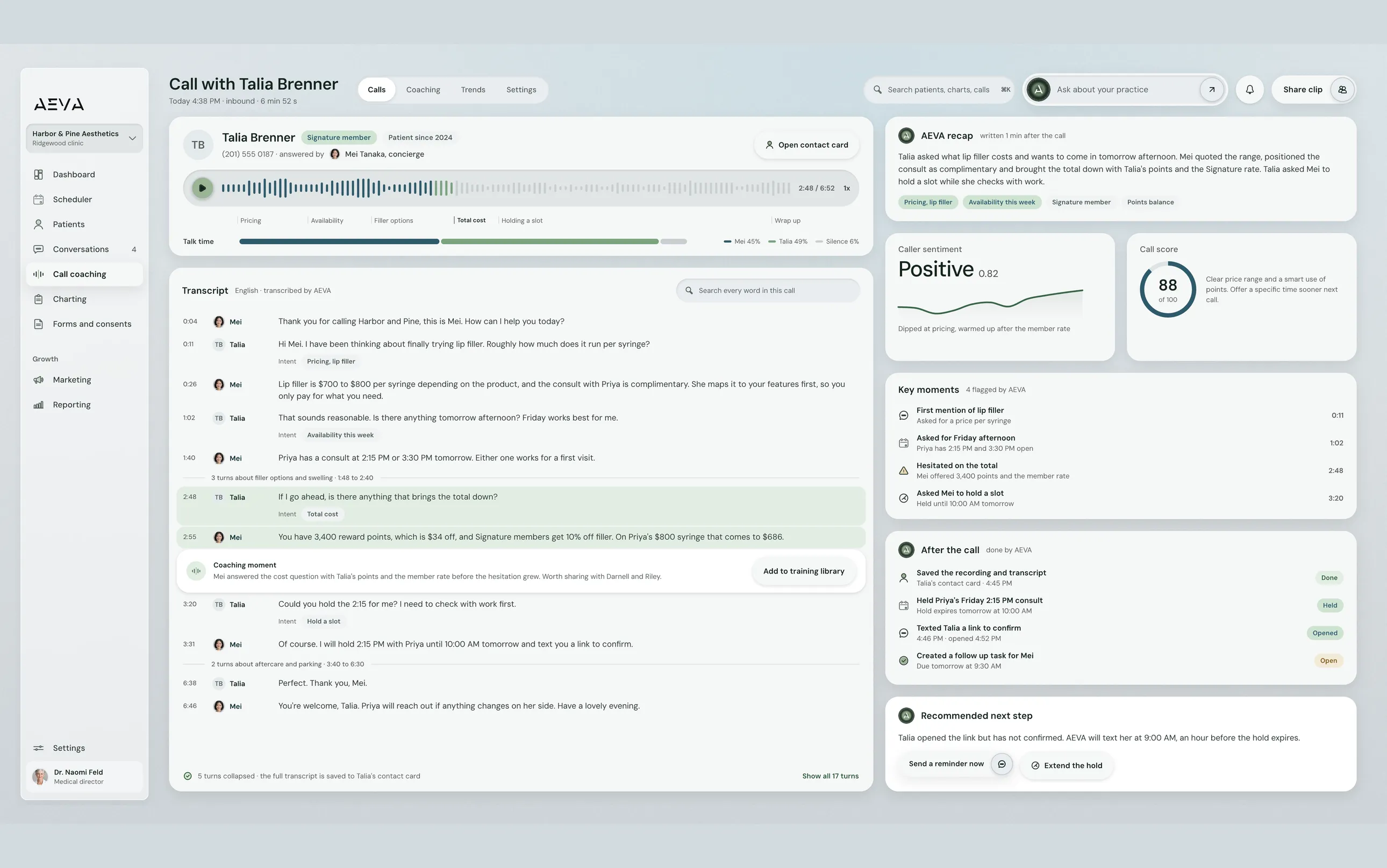
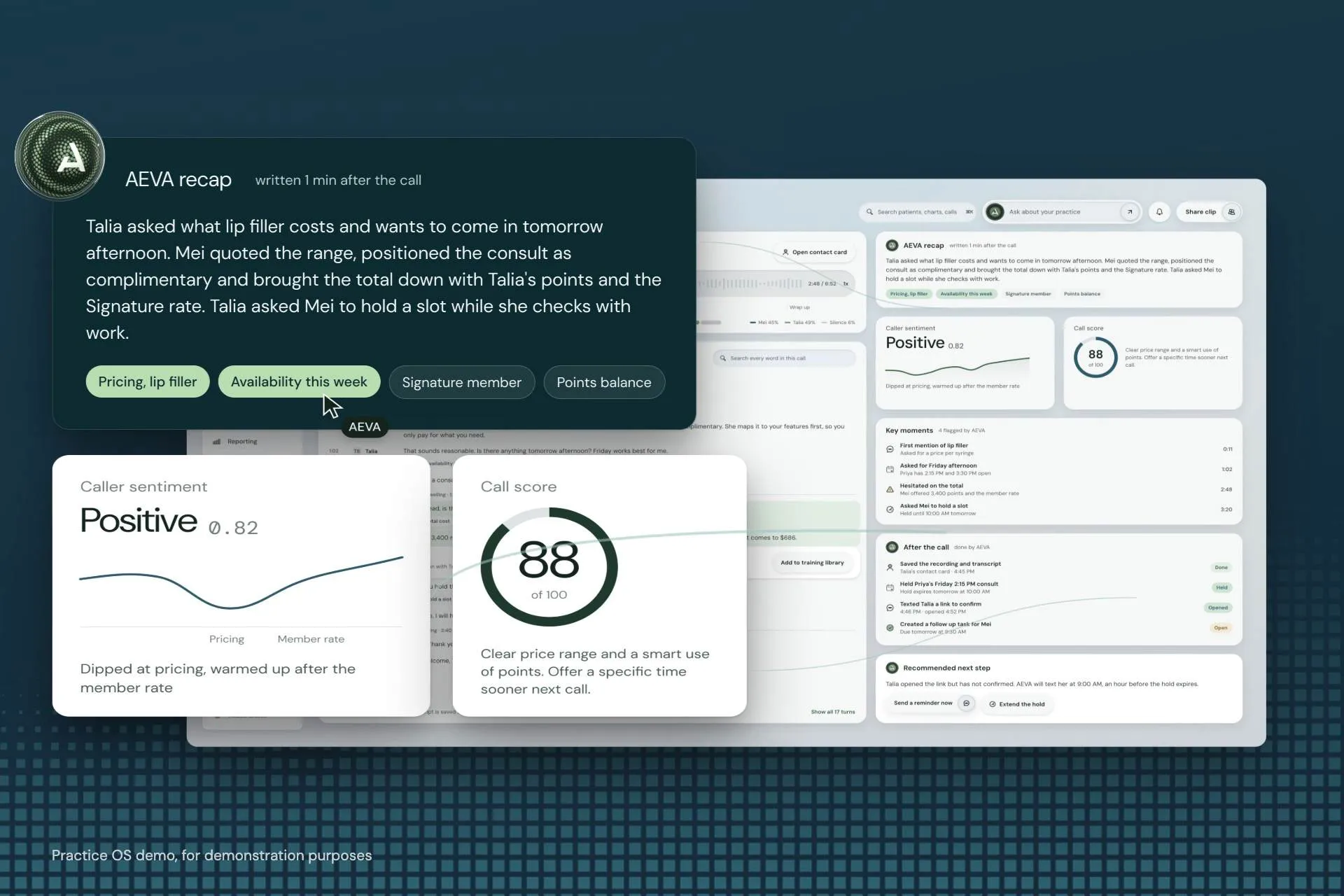
Practice OS, call detail with the recap and key moments. Demo data.
See it working
A call recap, start to finish
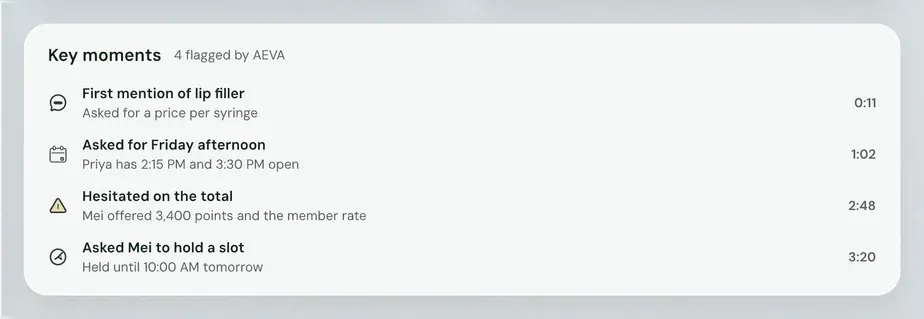
Here's a demo call with Talia, a patient asking about lip filler. Her transcript with the front desk runs down the left. On the right, AEVA's recap sits above her sentiment and a call score. Four key moments are flagged, from her first price question to asking the desk to hold a slot. A recommended next step closes it out.
Watch Practice OS
One call, recapped
Watch a call get recorded, recapped and scored, then see the trends across all your calls. It's captioned.
In the film
- Recorded and transcribed
- The recap and key moments
- Coaching and trends
Read the transcript of AEVA's film
Talia calls about lip filler. Practice OS records the call, transcribes it and files it on her contact.
When the call ends, AEVA writes a short recap, with her sentiment and a call score.
Key moments are flagged with their times, from her first mention of lip filler to asking Mei to hold a slot.
Then it recommends what your team should do next.
Every call gets a coaching score, so your manager sees where it went well and where the team can improve.
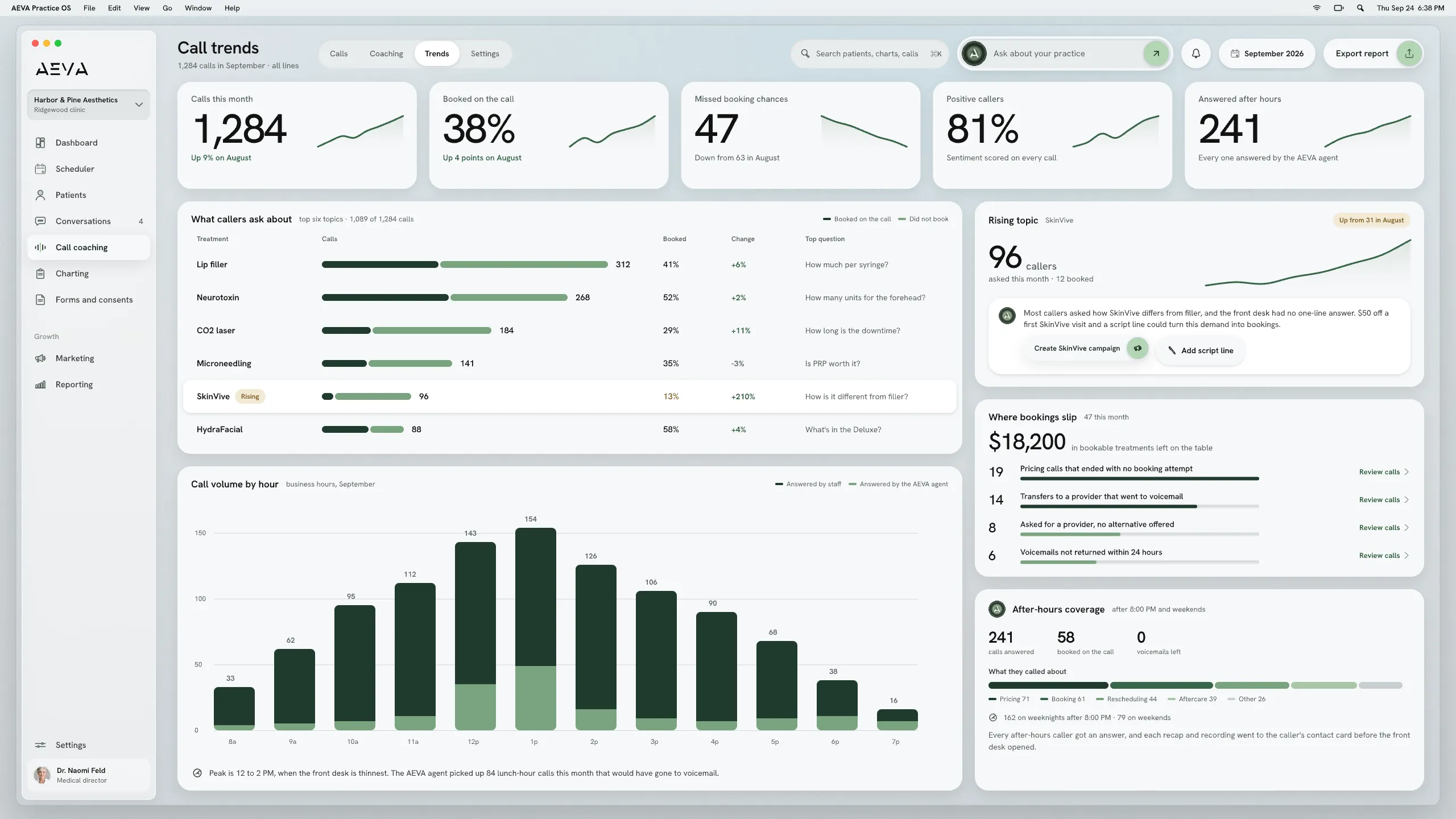
Across all your calls, it shows what patients keep asking for, and where bookings are slipping by.
What it does
From a phone call to a next step
AI call intelligence records every call to your practice and writes it up in plain English. Then it suggests what your team should do next.
-
Every call, recorded and searchable
A patient calls about lip filler. Practice OS records the call, transcribes it and files it on her contact. Weeks later, when she calls back, your front desk can search what was said instead of guessing.
-
A plain-English recap of each call
When the call ends, Practice OS writes a short recap. It pulls out the caller's sentiment, what they wanted and the key moments, then recommends a next step. Nobody has to remember who said what.
-
Coaching scores for the front desk
Every call gets a coaching score that shows how it was handled. Your manager sees where a call went well and where the team can improve, with the transcript right there. The next team huddle can start from real calls.
-
Trends across all your calls
Practice OS also looks across all of your calls at once. It shows what patients keep asking for and where booking opportunities are slipping by. When the same question keeps coming up, you'll see it.
Limits and handoffs
What does AEVA call intelligence not do?
AI call intelligence reads and scores your calls. The people on your team still own the conversations and the follow-up.
What it leaves out
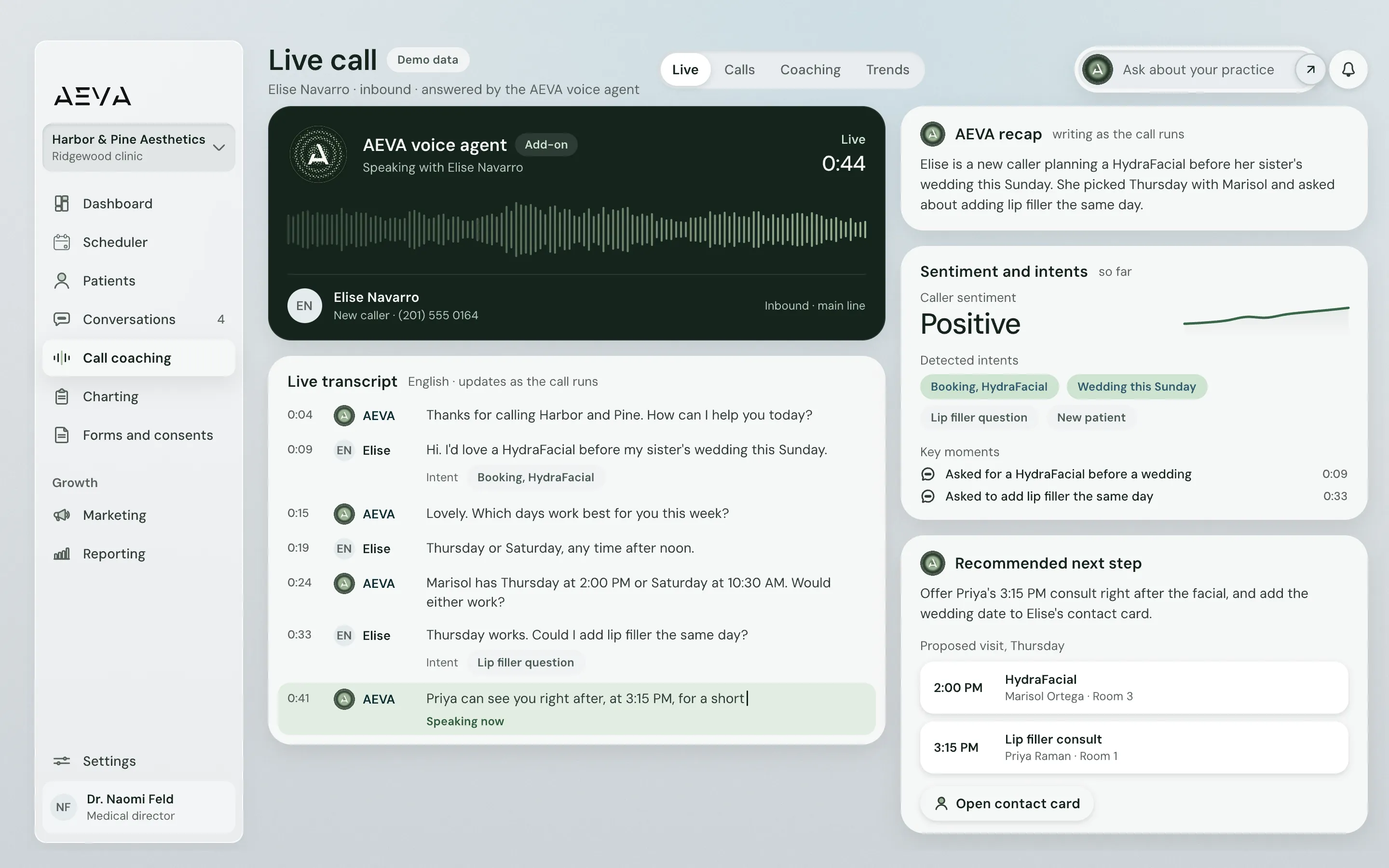
- It doesn't answer the phone. The AEVA voice agent does that, as an add-on.
- Its coaching scores point to what to fix. A manager on your team does the coaching.
- It works on phone calls. Texts and DMs land in the unified inbox.
When a person takes over
A person takes over once the recap is in. Your front desk lead reads it, checks the key moments and decides on the follow-up. Managers take the coaching side.
Experts answer for the results, and the AI cannot make things up about your practice.
Getting set up
Up and running with AEVA's team
Migration means moving your patient list and appointment history onto AEVA. You can import it yourself, or AEVA's team can.
- Sign up You sign up with AEVA, and your practice can start using Practice OS right away.
- Business details You submit your business details for texting, which lets AEVA get texting switched on for your practice.
- Meet with AEVA You meet with the AEVA team and walk through how your practice runs, so AEVA builds to your needs.
- Training AEVA trains your team on Practice OS. After training, your practice is ready to go.
Texting can take up to a week to switch on.
Key facts
Key facts on call intelligence
Everything listed here is live in Practice OS today, on one platform.
In short
AI call intelligence runs inside AEVA Practice OS, built for med spas and other aesthetic practices. It records your calls, recaps them and scores them for coaching. Every recording and transcript is attached to the right patient's contact.
See how pricing works
AI call intelligence at a glance
- Recording
- Every call to the practice, recorded and transcribed
- Search
- Transcripts attached to the right contact, and searchable
- Per call
- Recap, sentiment, intents, key moments, next step
- Coaching
- Scores on each call and where to improve
- Trends
- What patients ask for, and where bookings slip
- Where it lives
- Inside AEVA Practice OS, on each patient's contact
Before a demo
Call intelligence questions
A few quick answers before you book a demo.
How much does AI call intelligence cost?
AI call intelligence runs inside Practice OS, which you can buy on its own. Every Growth Engine plan includes Practice OS, and the pricing page explains both.
How pricing worksWhich calls does AI call intelligence record?
AI call intelligence records and transcribes every call to the practice automatically. Each one is attached to the right patient's contact, so your team can search it later.
What happens when nobody picks up a call?
A missed call can trigger the missed incoming call notification in Practice OS. Your practice sets what it says and when it goes out, like any other notification.
Do recordings sit with the rest of the patient's history?
Recordings and transcripts sit on the patient's contact record in Practice OS. They're right next to that patient's conversation thread across texts, calls, Messenger and Instagram.
Does AEVA train AI on our patients' calls?
AEVA never uses patient data to train AI models. AEVA is HIPAA compliant. AEVA signs a Business Associate Agreement (BAA) with every customer at sign-up.

Hear what your calls tell you
AI call intelligence records, recaps and scores every call your practice takes, right on the patient's record. Book a demo to see a full call recap inside Practice OS for yourself.
Book a demo