Patient messaging for med spas
AEVA Practice OS puts med spa texts, calls and DMs in one inbox. AEVA Digital is a provider of med spa messaging software.

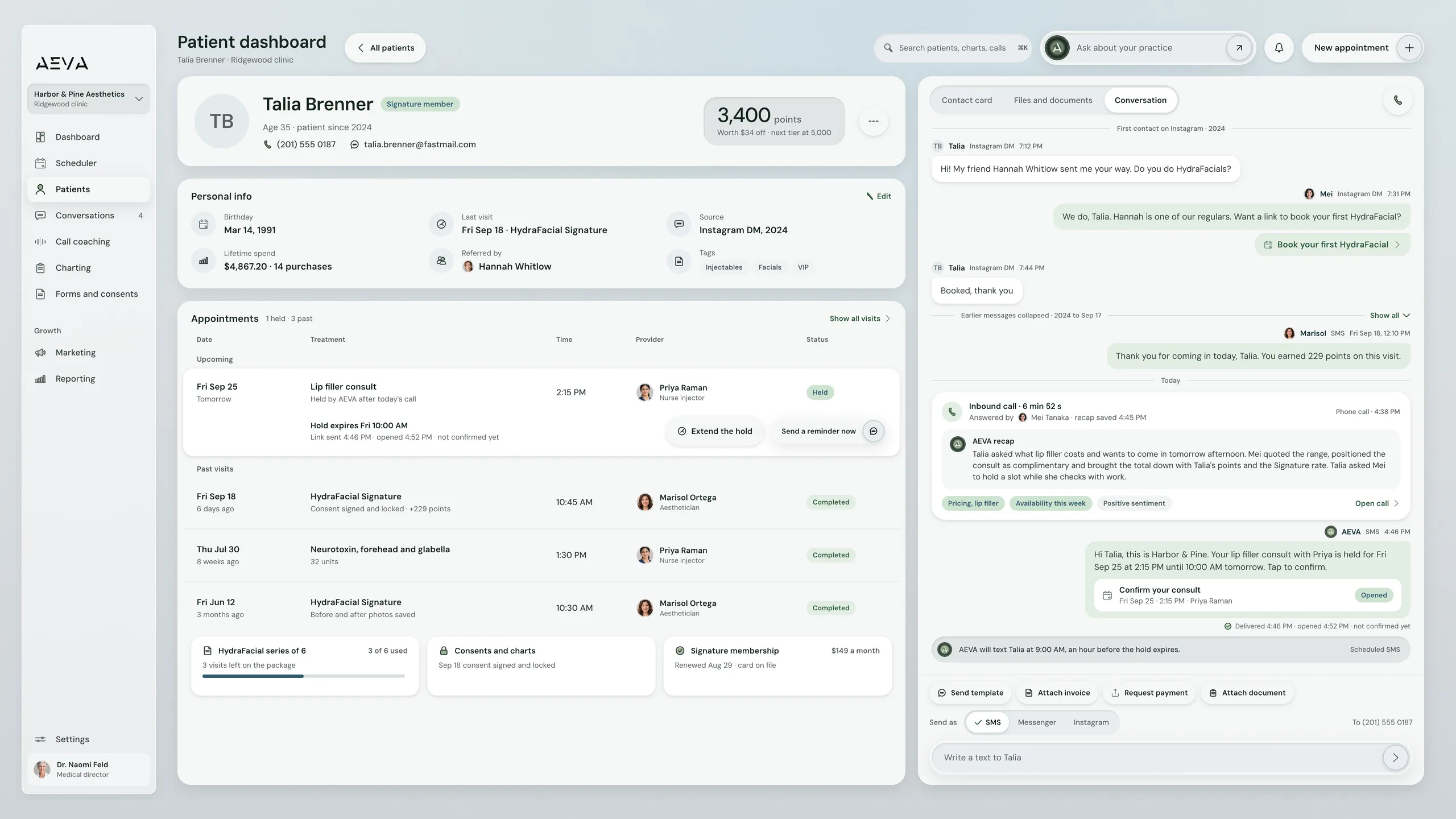
Practice OS, patient dashboard with the conversation thread. Demo data.
See it working
One thread for each patient
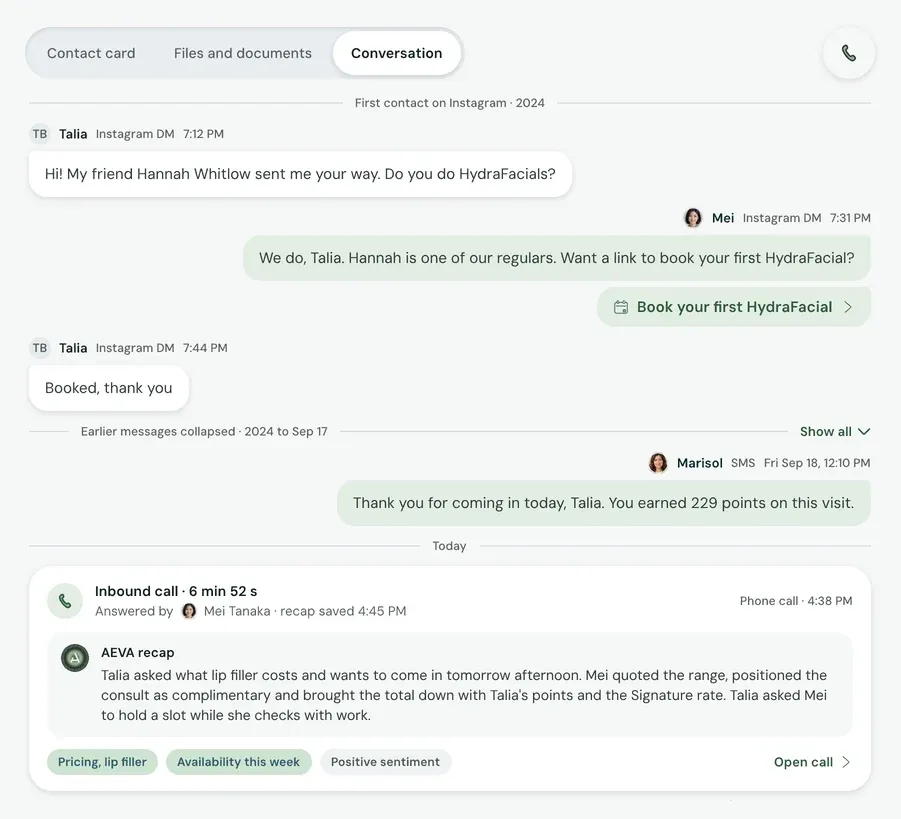
Here's Talia Brenner, a demo patient. Her record's on the left, and her messages and calls with the practice are on the right (it starts with an Instagram DM). Next comes a text from Marisol, then today's call with Mei and its recap. Want to reply? Your team can send a template, invoice, payment request or document by SMS, Messenger or Instagram.
Watch Practice OS
Patient messaging in Practice OS
Watch Practice OS messaging at work. The film has captions, and you can read the full transcript on this page.
What it does
Answer patients, then follow up
Practice OS messaging gives your team one inbox for patient replies. It also runs follow-up campaigns and bulk texts and emails from the same record.
-
One inbox for every channel
Whether a patient messages you on Instagram, texts you, or calls you, they all end up in the same Conversations thread. The side panel shows the patient's information. You can respond with a saved template. You can request payment or send an invoice from within the thread.
-
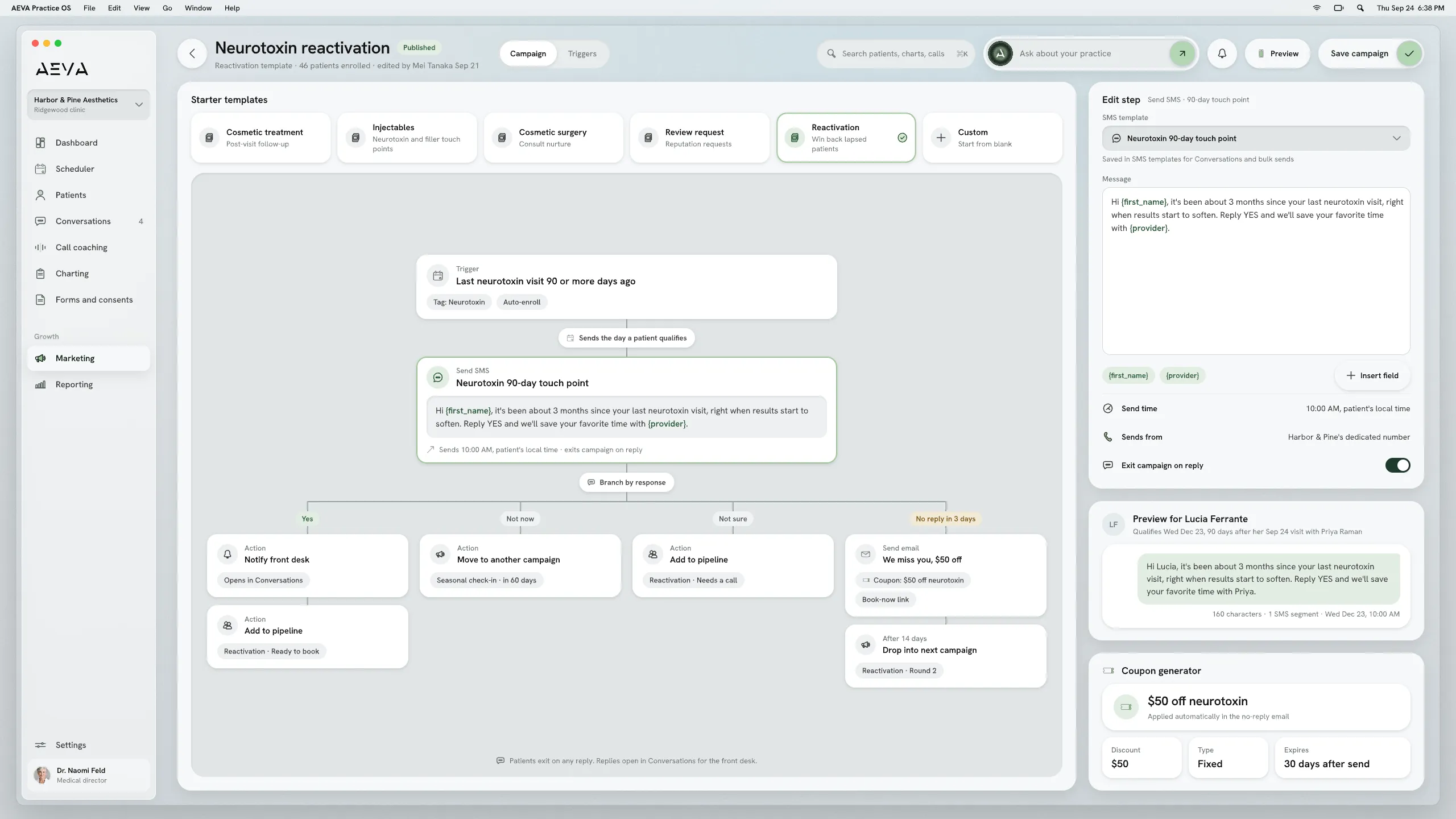
Campaigns that branch on replies
Say someone fills in your contact form (or an ad form). Practice OS drops them into a campaign and sends each step on the timing you picked. Once they reply, it stops. Depending on how they answered, it can move them into another campaign.
-
Bulk texts and email
Need to reach a whole group? Pick the contacts and send a bulk text or email. Build emails in the simple editor or the drag-and-drop one, and preview them on desktop and mobile. Once an email's out, you'll see opens, clicks and bounces.
-
Funnels for every stage
Your campaigns add contacts to pipelines by themselves. There's a reactivation funnel, a pipeline only for ad leads, and custom ones for any group you'd like to watch. You decide what the stages are, so it's easy to see where each patient is.
Limits and handoffs
What does messaging leave to your team?
Practice OS messaging sends your campaigns and gathers every channel in one inbox. Patient replies go to your team.
What it leaves out
- A campaign stops sending the moment a patient replies to it.
- Texting comes with a monthly SMS allowance, and you can add more when you need it.
- Texts can't go out until texting is switched on, which can take up to a week.
When a person takes over
When a patient replies to a campaign, the campaign stops and the reply shows up in Conversations. Your front desk takes it from there, with that patient's details open in the side panel.
Experts answer for the results.
Getting set up
From sign-up to your first text
You can start right away. Import your own patient data, or AEVA's team can do it for you.
- Sign up Sign up for Practice OS. Your team can start working in it right away, even before texting is on.
- Texting details Send us your business details for texting. Practice OS texts patients from a number dedicated to your practice.
- Planning call Meet with the AEVA team and walk us through how your practice runs, so we build Practice OS around your needs.
- Training AEVA trains your team on Practice OS. Once training is done, you're ready to send your first text.
Migration means moving your patient list and appointment history onto AEVA.
Key facts
Messaging in short
Messaging is live today in Practice OS, and it writes to the same patient record as everything else.
In short
Practice OS messaging gives med spas (and other aesthetic practices) one inbox for SMS, phone calls, Facebook Messenger and Instagram DMs. It runs your campaigns too, which stop as soon as a patient replies, and sends bulk texts and emails. And every conversation ends up on that patient's record.
See how pricing works
Messaging at a glance
- Channels
- SMS, phone calls, Facebook Messenger and Instagram DMs
- Texting number
- A phone number dedicated to your practice
- Campaigns
- Timed steps that branch on how a patient responds
- Simple or drag-and-drop editor, with opens, clicks and bounces
- Reminders
- A text a day before, then again if unconfirmed
- Availability
- Part of Practice OS, which every Growth Engine plan includes
Before a demo
Messaging questions
A few quick answers before you book a demo.
How much does Practice OS messaging cost?
Practice OS messaging comes with Practice OS. You can buy Practice OS on its own or get it with any Growth Engine plan. The pricing page explains both.
How pricing worksCan we text patients from our own number?
Practice OS texts patients from a phone number dedicated to your practice. Their replies come into Conversations, in the same thread as their calls and DMs.
Does messaging send appointment reminders on its own?
Messaging in Practice OS texts a reminder one day before each appointment. If the patient still hasn't confirmed, it texts again one to two hours before.
What text reminders do for attendanceCan we answer Instagram and Facebook messages here?
Instagram DMs and Facebook Messenger chats come into the same Practice OS inbox as texts and calls. Your team answers every patient from that one inbox.
What happens when a patient replies to a campaign?
The campaign stops for that patient as soon as they reply. Their message shows up in Conversations, so someone on your team can pick it up.

One inbox for every patient
Practice OS messaging keeps texts, calls and DMs on one patient record and runs the campaigns that bring patients back. Book a demo, and we'll show you the inbox, a campaign and the record they write to.
Book a demo