
Platform
Your practice, in your patients' pocket.
The med spa patient app puts your practice's name in the patient's pocket. Branded for the practice and available now, released July 2026, it lets patients book in about a minute, sign consent, manage memberships, and redeem loyalty, all on the same system the front desk works in.
- Native iOS app
- Self-service booking
- Memberships and loyalty
- Available now
How it works
Book, sign, and buy from the app.
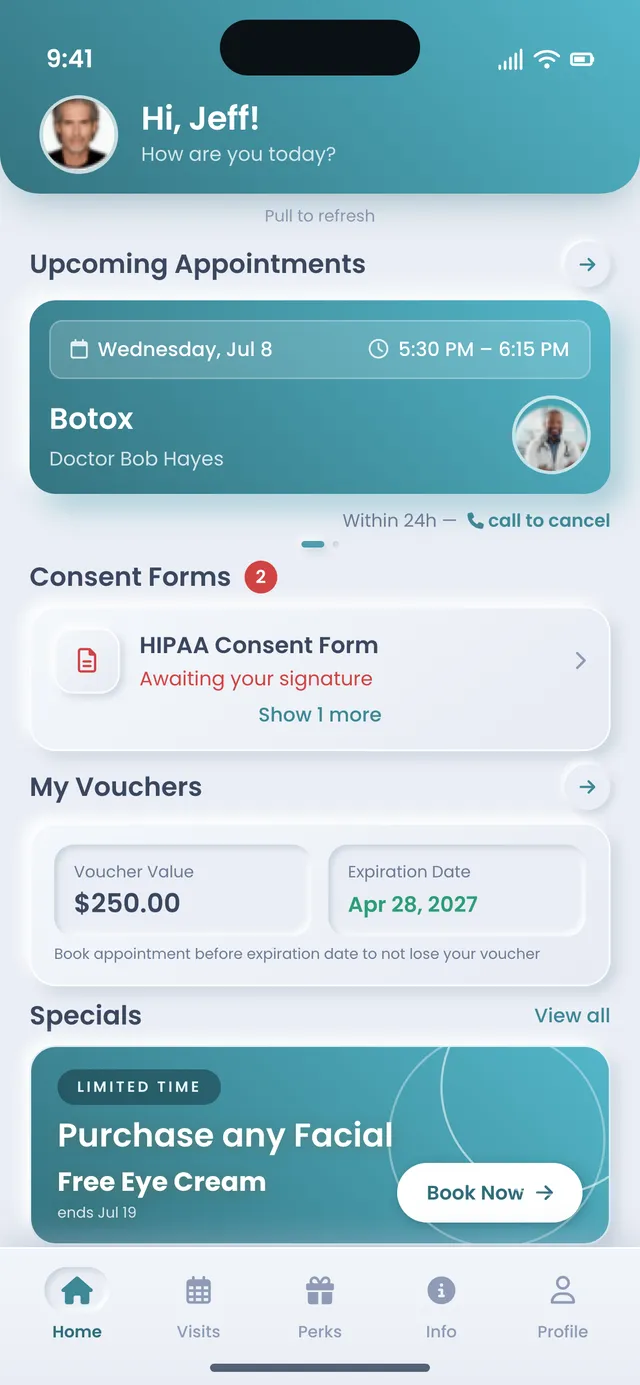
The med spa patient app opens on a home screen built around the patient, with the next appointment, any consent form still to sign, their vouchers, and their loyalty level all in view. From there they book a visit, sign consent remotely, self-subscribe to a membership, or buy a pushed offer, without ever calling the front desk.
-
A home screen for each patient
A personalized greeting, the next appointment, any consent form still to sign, a voucher with its expiration, a Specials carousel, and the loyalty level, all on the opening screen.
-
Booking in about a minute
A three-step stepper, choose the service, add details, book, with a provider picker, a date strip, and real-time slots. Patients can also request a consult or rebook a past visit and provider.
-
Perks in the Perks tab
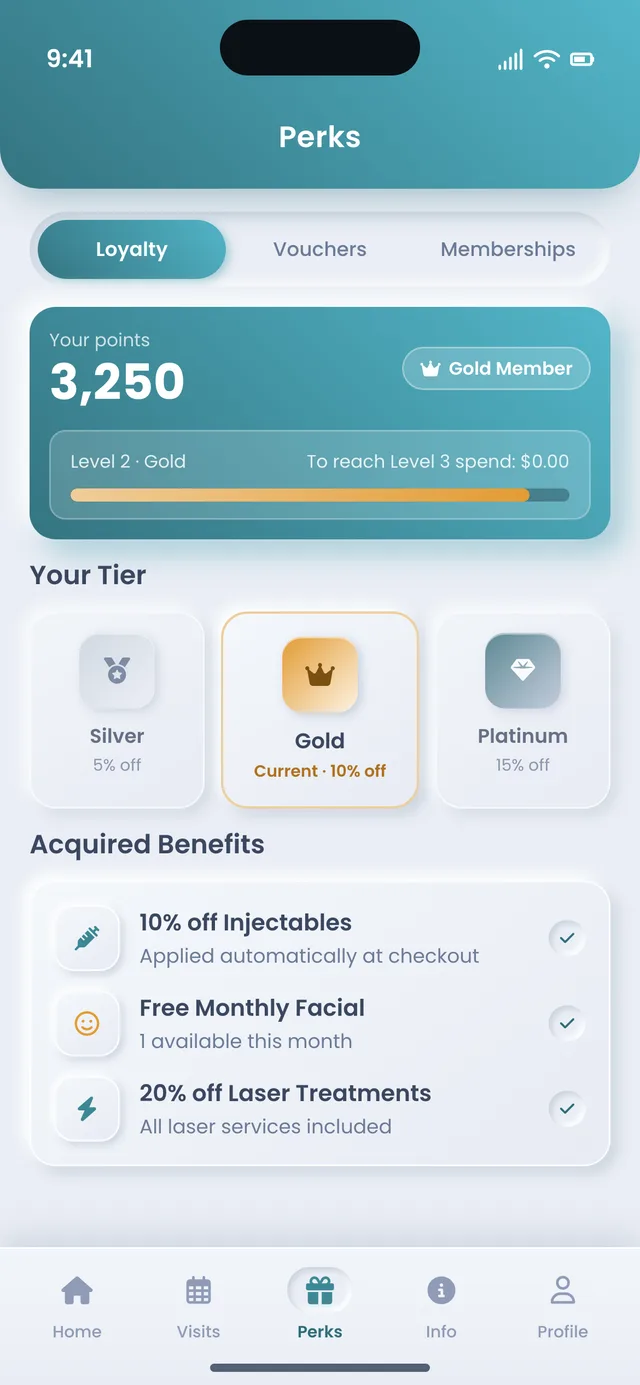
Loyalty points with a tier ladder, a searchable voucher catalog with each reward's point cost, and memberships to browse and self-subscribe to, with cancel-anytime and an auto-renews-monthly note.
-
Offers that land as a tap
A limited-time offer arrives as a notification on the patient's phone. They buy it in a couple of taps, and the credit or voucher lands on their account, ready to redeem at the next visit.
The home screen does the reminding
The next appointment, a consent form still to sign, a voucher counting down to its expiration, and the current loyalty level all sit on the opening screen, so the patient sees what to do next the moment they open the app.
Perks live where patients look for them
The Perks tab holds loyalty, vouchers, and memberships in one place. Patients watch their points climb the tier ladder, check each reward's value and point cost in the voucher catalog, and self-subscribe to membership plans with the auto-renews-monthly, cancel-anytime note in plain view. Nobody phones the desk to ask what they have.
A push offer closes without a call
A patient can buy a pushed offer straight from the notification, and the app files the credit, package, or voucher to their account on its own, ready to redeem at the next visit. No one calls the desk, and your team enters nothing.
Step by step
The life of a tap.
Follow one patient from opening the app to walking back in for another visit. Each step happens on the same system the front desk and the calendar work in, so a booking, a signed consent, or a tapped offer is already there for the practice the moment it happens, with nothing re-keyed between the phone and the desk.
-
The patient opens the app
The home screen greets them by name and shows the next appointment, a consent form to sign, a voucher, and their loyalty level, so the first thing they see is what to do next.
-
They book or buy
They book a visit in about a minute, sign consent from a full-text modal, self-subscribe to a membership, or tap a pushed offer, whichever they came in to do, all without a phone call.
-
Everything updates at once
The booking, the signed consent, the membership, and the purchase all write to the same place the practice works in, so the front desk sees them without anyone re-entering a thing.
-
A push offer brings them back
Between visits, a pushed offer gives the patient a reason to rebook. They buy straight from the notification, and the credit is waiting the next time they open the app.
The difference
One connected app or a bolted-on booking widget.
A practice can hand patients a standalone booking widget, a separate loyalty app, and an email link for forms. Each piece works on its own. The gaps between them are where a patient signs a form the chart never receives, or redeems a reward the front desk cannot see.
| What you are comparing | On the AEVA record | A bolted-on stack |
|---|---|---|
| What the patient sees on open | Next visit, pending consent, vouchers, and loyalty, together | A booking form, and the rest scattered across links |
| Signing a consent form | Signed in-app, written to the same chart the provider uses | A separate form tool the chart never receives |
| Loyalty and vouchers | Seen and redeemed in the app, off the same balance the desk sees | A loyalty app the front desk has to look up by hand |
| Memberships | Browsed and self-subscribed to from the Perks tab | A call to the desk, or a checkout the patient never finishes |
| A pushed offer | Bought in a couple of taps, applied to the account on its own | An email blast, then manual entry when someone replies |
| The practice's name | On the app icon and the header, on the patient's phone | A third-party brand the patient books through |
- What the patient sees on open
- Next visit, pending consent, vouchers, and loyalty, together
- A booking form, and the rest scattered across links
- Signing a consent form
- Signed in-app, written to the same chart the provider uses
- A separate form tool the chart never receives
- Loyalty and vouchers
- Seen and redeemed in the app, off the same balance the desk sees
- A loyalty app the front desk has to look up by hand
- Memberships
- Browsed and self-subscribed to from the Perks tab
- A call to the desk, or a checkout the patient never finishes
- A pushed offer
- Bought in a couple of taps, applied to the account on its own
- An email blast, then manual entry when someone replies
- The practice's name
- On the app icon and the header, on the patient's phone
- A third-party brand the patient books through
For how the patient app connects to the rest of the platform, see the full platform.
Who it's for
Built for practices patients come back to.
The patient app earns its place wherever a cash-pay practice lives on the visit after the first one. That is most of them. The dermatology office running membership skincare needs the same thing as the surgeon nurturing a post-op patient toward the next procedure, booking, memberships, loyalty, and consent on the one system the front desk already works in.
Practices that live on repeat visits
Memberships, packages, loyalty, and rebooking all depend on the patient staying engaged between appointments. When the loyalty ladder, the voucher catalog, and one-tap rebooking all sit in an app the patient already has, the practice keeps a channel open without a single reminder call, and gives patients an easy reason to come back.
Front desks buried in booking calls
Every appointment booked, consent signed, and membership started in the app is one call the front desk never had to take. Patients handle routine requests in about a minute, and the team gets those hours back for the patients in the room.
Owners who want their own brand on the phone
The app carries the practice's own name on the icon and the header. Every booking and purchase inside it writes to the same place the paid ads and SEO report against, so the next marketing dollar goes where it already worked. That owned spot on a patient's home screen beats a rented slot in someone else's booking app.
Booking, memberships, loyalty, and consent all live where the front desk already works.
Connected end to end
Your name in their pocket, between visits.
Because scheduling, charting, checkout, and the patient app all run on one connected system, the patient and the practice always see one consistent picture. A booking, a signed consent, a membership, or a tapped offer lands there the instant it happens, and a matching web portal mirrors the app for browser users.
The patient app is one part of the platform that runs the whole practice. See the full platform.
-
The personalized home -
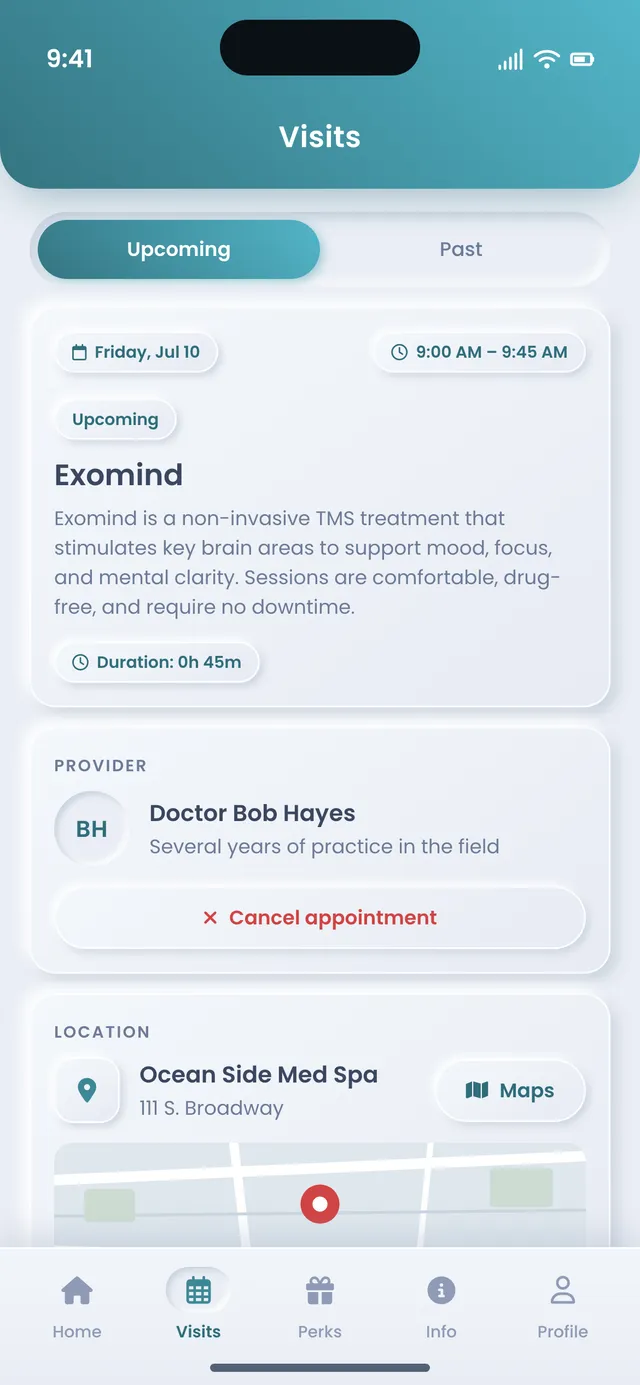
The Visits tab
Frequently asked
What practices ask about the patient app.
Straight answers to the questions practices ask most about the patient app, from whether it is available and how it is branded to signing consent, running push offers, managing memberships and loyalty, and how it stays connected to the front desk. Anything not covered here, we will walk through live on a demo with your own patient flow.
Is the AEVA patient app available now?
Yes. The branded native patient app is available now, released July 2026. It is a real iOS app, branded per practice, so it carries the practice's name on the icon and the teal-gradient header. Patients also get a matching web portal for anyone who would rather use a browser, with the same points, vouchers, memberships, past visits, and remote consent signing.
What can patients do in the med spa patient app?
Patients book a visit in about a minute, request a consult, or rebook a past service and provider. They sign consent forms remotely, browse and self-subscribe to memberships, watch their loyalty points climb a tier ladder, redeem vouchers from a searchable catalog, and buy a pushed offer in a couple of taps, all without calling the front desk.
Is the patient app branded for my practice?
Yes. The patient app is branded per practice. It carries your name on the app icon and a teal-gradient header, with white cards and a five-tab layout, Home, Visits, Perks, Info, and Profile. For a cash-pay practice building credibility, that owned presence on a patient's home screen keeps your name in front of them between visits, instead of a third-party marketplace brand.
Can patients sign consent forms in the patient app?
Yes. Any consent form still to sign surfaces on the app's home screen, and the patient opens it as a full-text modal with a sticky Sign button. Because the app writes to the same system as charting, the signed form lands on the chart the provider uses, then locks so the signed record cannot be altered. Patients can also complete forms from the matching web portal.
How do push notifications and one-tap offers work in the app?
The practice sends a sale, a limited-time offer, or an announcement to patients' phones, either the whole patient base or a targeted segment. When a patient buys from the notification, the purchase files to the same system as checkout, so the credit, package, or voucher is applied to their account with no manual entry, ready to redeem at the next visit.
Can patients manage memberships and loyalty in the patient app?
Yes. In the Perks tab, patients browse membership plans and self-subscribe, seeing the benefit list and an auto-renews-monthly, cancel-anytime note before they enroll. Loyalty shows their points balance, tier banner, and the full ladder of current and locked tiers, and the voucher catalog lists each reward's value, terms, and point cost, so patients redeem rewards without asking the desk.
Does the patient app share the same record as the front desk?
Yes. Every booking, signed consent, membership, and purchase from the app lands where scheduling, charting, and checkout already work, the instant it happens. The patient and the practice see one consistent picture, with nothing re-keyed between the phone and the desk.
See the patient app run on the platform that runs the practice.
Bring the way your patients book, pay, and come back today, and we will walk through booking, memberships, loyalty, consent, and push offers on the app and the matching web portal, so you can see how it keeps your name in their pocket between visits.