Med spa CRM on one patient record
Med spa CRM software from AEVA Digital keeps every patient on one record. Your whole team works from it.

Practice OS, patient record. Demo data.
See it working
One patient, one contact card
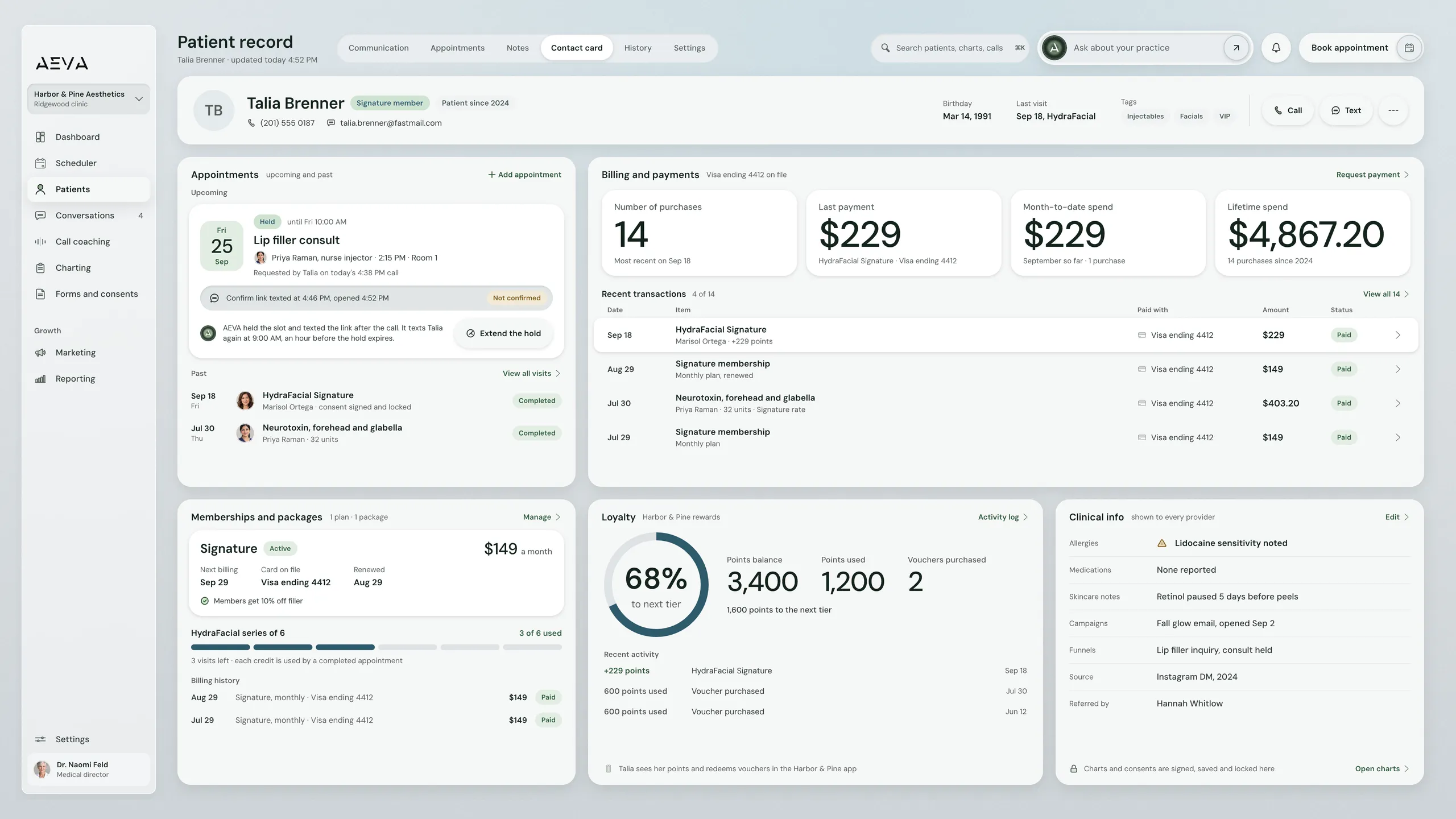
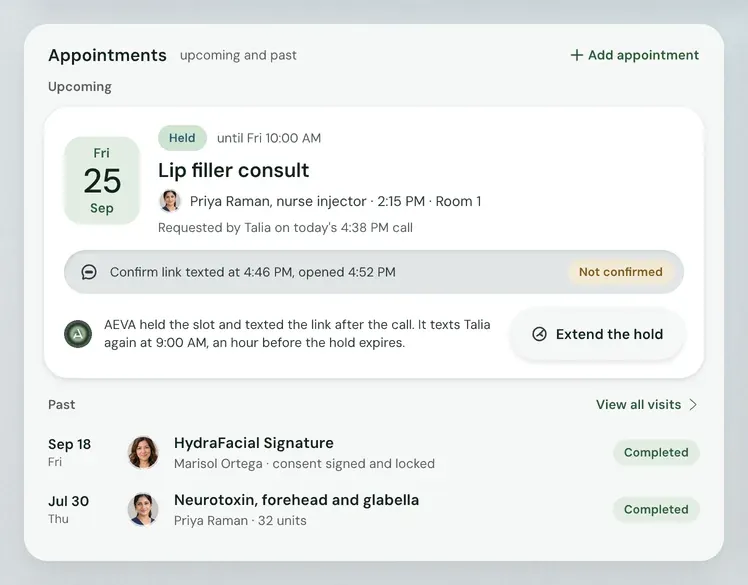
This is one of our demo patients, Talia Brenner. At the top, you can see her tags, membership, and last visit. Below that, you can see she has an upcoming lip filler consultation. You can also see her history of treatments and how much she paid for each. We also show package credits and loyalty points. Finally, you can see this patient has an allergy note that all providers will see.
Watch Practice OS
Follow one visit in Practice OS
The film follows one patient from check-in to checkout.
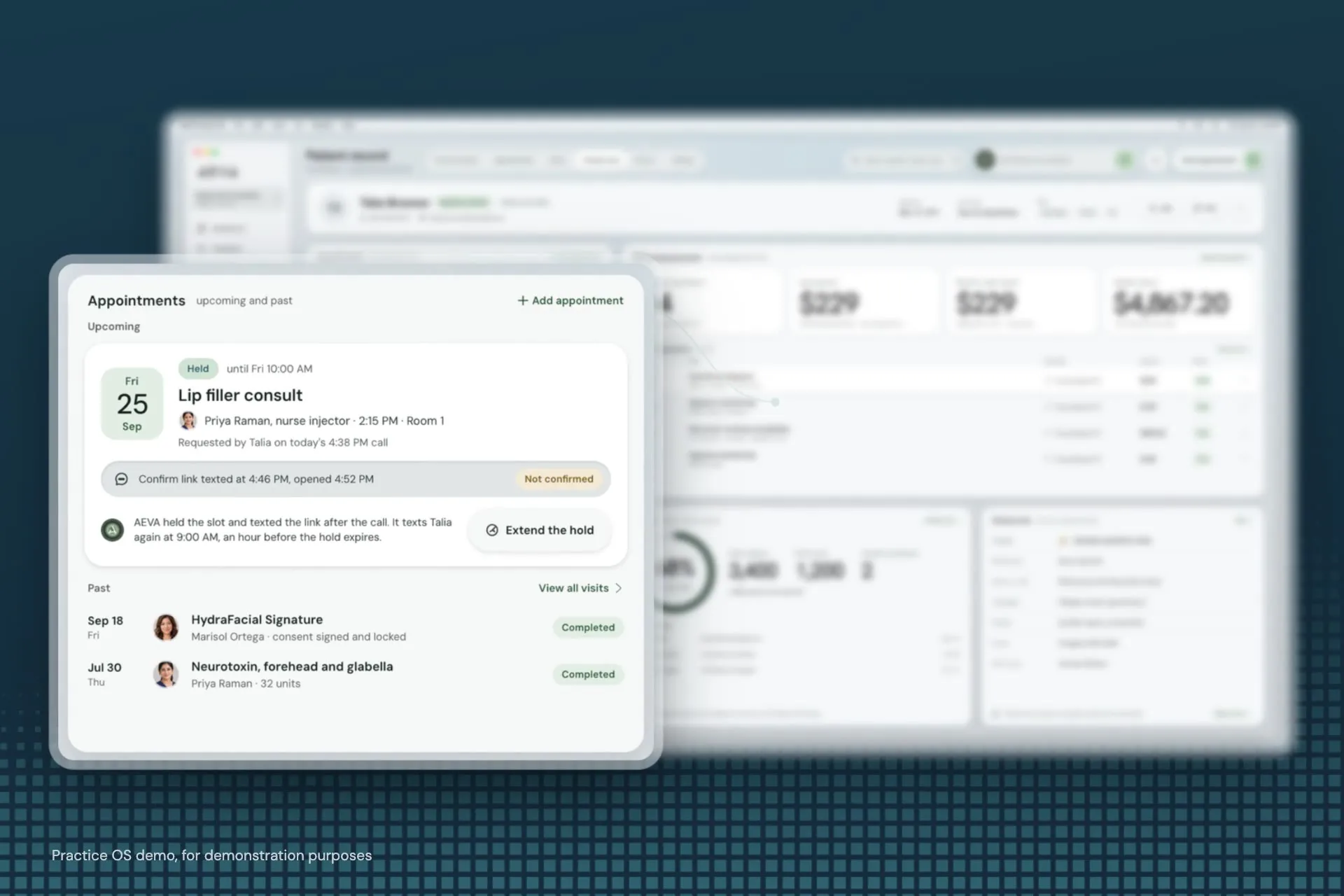
In the film
- Check-in at the front desk
- The visit, charted on the record
- Checkout on the same record
Read the transcript of AEVA's film
This is Talia. Her tags and membership sit right at the top, next to her last visit.
Below, her upcoming lip filler consult, and every past treatment with what she paid.
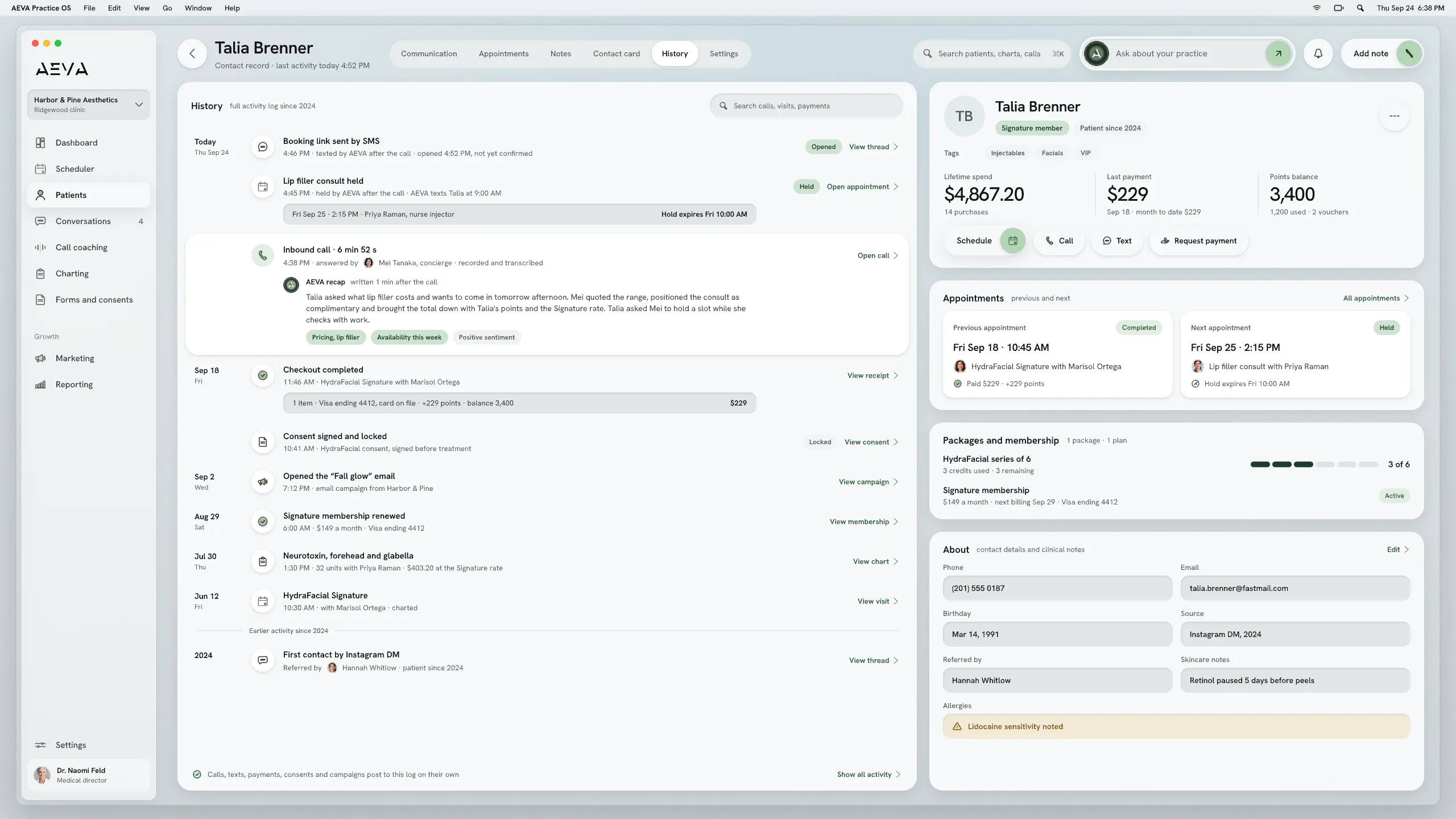
Every call, text and note with the practice stays in one thread.
Her visit is charted on the same record, and her allergy note is in front of every provider.
At checkout, her package credits apply, and she earns loyalty points.
When she leaves, her record is ready for the next visit.
What it does
Everything you know about each patient
The CRM holds everything your practice knows about a patient, so your front desk, providers and managers all work from the same record.
-
One card for the whole patient
Open a patient and it's all there. Appointments, payments, memberships, packages and loyalty points sit on one contact card. Your providers compare before-and-after photos side by side, and signed charts and consents lock so nobody can change them.
-
Every conversation in one thread
A text, a phone call, a Facebook Messenger chat or an Instagram DM all end up in one thread on the patient's record. Your front desk can send a template from there, attach an invoice or ask for a payment. Calls are recorded and transcribed there too.
-
Tags, lists and bulk messages
If your list has duplicates, merge them after you import it, and each patient keeps one record. Tagging works in bulk. So does texting or emailing a whole group. Afterward, the bulk history shows who got the message, which sends failed and who's on do-not-disturb.
-
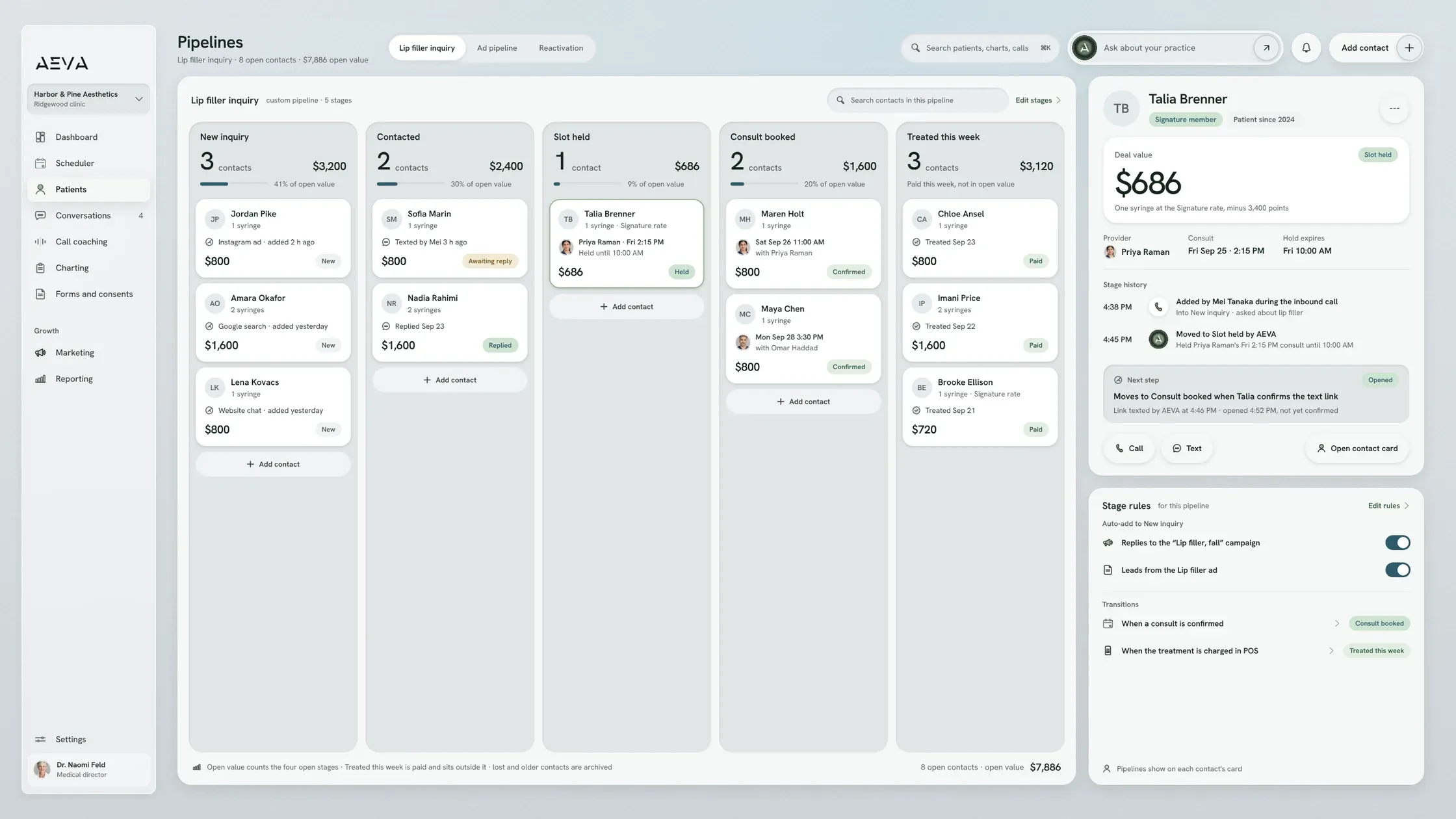
From ad click to checkout
Now, let's say a new patient fills out your contact form. You can use that as a trigger to start a campaign. (Other triggers could be the chat widget or an ad form.) As the patient goes through your pipeline, if they came from an ad, Practice OS will link their payment at checkout back to the ad.
Limits and handoffs
What doesn't the AEVA CRM do?
The AEVA CRM keeps the record and runs your campaigns. Your team still decides what those campaigns say.
What it leaves out
- Escripts are expected late 2026, so the CRM doesn't send them yet.
- Medical billing is expected late 2026, so it isn't in the CRM yet.
- Templates come with default messages, and your team edits each step.
When a person takes over
As soon as a patient replies, the campaign stops and the reply lands in Conversations. Your front desk picks it up from there, with the patient's details open in a side panel.
Getting set up
How you get set up on AEVA
Migration means moving your patient list and appointment history onto AEVA. Import it yourself, or let AEVA's team handle it.
- Sign up Sign up for Practice OS and send us your business details so texting can be set up.
- Meet the team Meet with AEVA's team and walk us through how your practice runs. We build Practice OS around your needs.
- Training Your team gets trained on Practice OS, so everyone knows where to find a patient's record.
- Ready You're live! You can start right away, with your whole team on the same patient records.
Texting can take up to a week to switch on.
Key facts
The CRM, in brief
For owners and managers looking to compare their options, here are the basics of AEVA’s CRM.
In short
AEVA Digital is a provider of med spa CRM software for med spa owners and managers. The CRM is part of Practice OS, and it keeps one record for each patient. Appointments, texts and charts go there. So do memberships and payments, so nobody's digging through another system.
See how pricing works
CRM at a glance
- What it is
- A CRM that keeps one record per patient.
- Part of
- Practice OS, the software that runs your practice.
- How to buy
- Practice OS on its own, or with any Growth Engine plan.
- Access
- Role-based permissions and two-factor authentication options.
- Compliance
- AEVA is HIPAA compliant.
- Connections
- Practice OS can also connect to other platforms through webhooks.
Before a demo
CRM questions
A few quick answers before you book a demo.
How much does the AEVA CRM cost?
The AEVA CRM comes with Practice OS, and AEVA doesn't list prices on the site. The pricing page covers how Practice OS and Growth Engine plans fit together.
How pricing worksDoes the CRM work with the EMR we already use?
AEVA can replace the scheduler, the charting tool and the point of sale, or connect with the systems a practice keeps, including EMRs.
CRM vs EMR for med spasCan we bring our current patient list over?
Migration means moving your patient list and appointment history onto AEVA. You can import it yourself, or AEVA's team can do it for you.
How does the CRM keep patient data safe?
The CRM has role-based permissions and two-factor authentication options. AEVA is HIPAA compliant. AEVA signs a Business Associate Agreement (BAA) with every customer at sign-up.
Can we use the CRM without AEVA's marketing?
The CRM works without the marketing, because Practice OS can be bought on its own. Every Growth Engine plan includes Practice OS, if you want both.

Book a CRM demo with our team
AEVA's CRM keeps appointments, conversations, charts, memberships and payments on one record for every patient. Book a demo, and one of AEVA's experts will show you how it would work for your practice.
Book a demo